















Retained revenue is the value of returns you keep as exchanges or credit instead of refunding. This article covers practical ways to increase it.
Retained Revenue Ratio
Retained revenue ratio is a key performance indicator (KPI) that shows how much revenue your business keeps when customers make returns.
When a customer chooses an exchange or credit instead of a refund, that revenue stays in your business. The retained revenue ratio is the percentage of return value kept this way.
- High ratio: most returns become exchanges or credit, so more revenue stays in your business.
- Low ratio: most returns become refunds, so more revenue is lost.
Benchmarks
- Fast fashion: around 5%
- Regular fashion: 10–15%
- Store credit: 3–5%
A ratio above these levels is strong performance.
Tracking this KPI shows how well your returns process protects revenue, and where to encourage more customers towards exchanges or credit.
Boost Exchanges
Customers choose an exchange over a refund when the exchange is quick, simple and good value.
Make exchanges easy
- Offer free domestic exchanges.
- Make your exchange policy clear before customers start a return.
A common approach is to charge a fee for returns but ship exchange orders free of charge. This covers part of your costs and gives customers a reason to exchange. You set fees per carrier and outcome. See How to set or change return shipping fees (Returns V2).
Turn on every exchange option
The more ways customers can exchange, the more likely they are to find something they want instead of taking a refund.
- Variant exchanges: customers swap for the same product in a different colour, material or size. Your product variants must be set up correctly in Shopify.
- Exchanges for a different product (Shop Now): customers choose a different product, or exchange one item for several. Shop Now can use the Swap portal or send customers to your own website. See Understanding Shop Now and Shop Later (Returns V2) and How to set up In-Store Shop Now (Returns V2).
To turn on exchange options:
- Go to Returns → Settings → Exchanges.
- In the Exchange options panel, turn on the exchange types you want to offer.
- Optionally, add a Shop Now bonus in the same panel. The bonus is a discount on the exchange item. See Understanding the Shop Now bonus calculation (Returns V2).
- Click Save.
Avoid restricting customers to items of the same value. Letting them choose higher-priced alternatives often increases total spend.
To test the effect of a Shop Now bonus, see How to run an A/B test on your Shop Now bonus (Returns V2).
Tell customers about your exchange benefits
If you offer free exchanges, or ship exchange orders at no extra cost, say so in your Returns Portal.
- Go to Returns → Design.
- Click Continue Editing.
- Click Next until you reach the screen you want to change.
- Click the pencil icon and edit the text.
- Click Save & Publish.
Examples of portal text:
- Free exchanges in the UK
- Exchanges are shipped at no additional cost
See How to Add Portal Entry Text (Returns V2).
Boost Credit
Credit keeps the value of a return in your business until the customer shops again. Swap offers two types:
- Gift cards (Shop Later): the customer receives a gift card for the value of their return.
- Shopify store credit: the value is added to the customer's Shopify account. See How to refund to Shopify store credit (Returns V2).
Make credit sound appealing
Clear messaging helps customers see credit as a better option than a refund.
- Go to Returns → Design.
- Click Continue Editing.
- Click Next until you reach the credit screen.
- Click the pencil icon next to the credit message and edit the main text and subtext.
- Click Save & Publish.
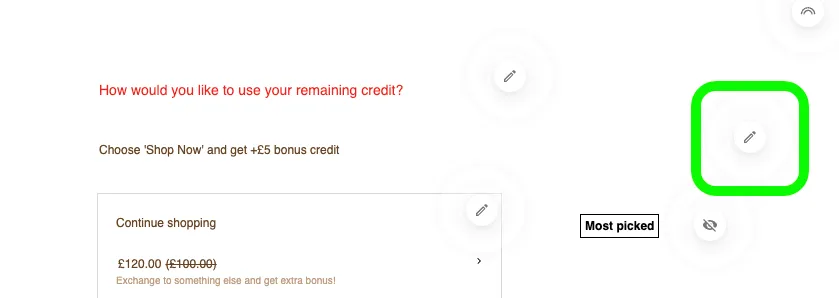
Examples of main text:
- Get 10% extra credit
- Enjoy 10% more store credit
- Free 10% bonus credit
Examples of subtext:
- Free returns + 10% bonus credit with a gift card code for later use
- Free returns when you opt for store credit (applied once the return is received)
- Take 10% more store credit & get free return shipping (applied once the return is received)
Add a credit bonus
A bonus on top of credit gives customers a strong reason to choose it.
- Bonuses above 10% typically deliver a noticeable increase in credit uptake.
- Customers using store credit usually spend 20–30% more than the credit amount, which increases average order value (AOV).
Gift cards and Shopify store credit each have their own bonus:
- Go to Returns → Settings → Discounts & Credit.
- For gift cards, in the Gift cards panel, enter a Bonus amount (% of return value).
- For Shopify store credit, in the Store credit panel, turn on Bonus amount (% of return value) and enter a percentage.
- Click Save.
Start with a small bonus, measure the results, and increase it if it works.
Example
One Swap merchant increased retained revenue by 67% after moving their store credit to Swap.
Reduce returns using data
Return reasons show why customers send items back. Use them to fix problems at the source.
To find your top return reasons:
- Go to Returns → Analytics → Return Reasons.
- Review the most common reasons over a time period.
- Look for recurring patterns or spikes.
Example
One Swap merchant saw frequent returns with the reason "too big". They added the word oversized to their product descriptions and added fit guidance. Their return rate dropped and retained revenue increased.
Set up carriers and fees
Shipping is a large part of the returns experience. The right carriers and fees reduce your costs and keep customers happy.
Swap provides domestic and international carriers such as Royal Mail, DPD and FedEx.
Setups that work well:
- Free exchanges or credit for domestic customers to encourage repeat purchases.
- Flat or tiered return fees to recover shipping costs fairly.
- Premium carriers for high-value returns (£100 and above), using Advanced Rules. See Understanding advanced rules (Returns V2).