















Advanced Rules give you fine-grained control over how returns are processed. They can often replace traditional tag-based setups like swap_noentry.
Each rule has two parts: conditions (when it applies) and actions (what happens). You can combine multiple conditions and actions in a single rule. Conditions can be joined with AND or OR logic — but not both in the same rule.
Quick examples
Here are two examples to show what Advanced Rules can do.
VIP customers get free returns
- Condition: customer is tagged with [tag] → VIP
- Action: set return postage to free
Discounted orders can't be refunded
- Condition: order was placed using one of the following discount codes:
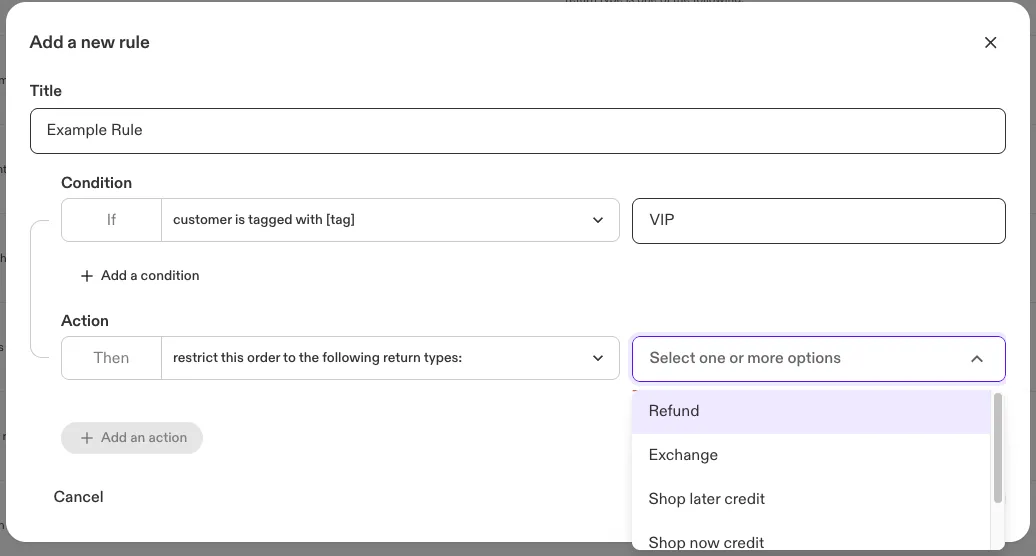
- Action: restrict this order to the following return types: → Store Credit, Equal exchange
💡 Avoid using order was placed with a discount code if your store uses codes for free shipping — this would apply to those orders too.
Accessing advanced rules
To create or manage rules:
- Go to the Swap Dashboard.
- Under Returns, select Advanced Rules.
From this page, you can:
- + New Rule: Create a new rule.
- Activate / Deactivate: Turn a rule on or off. Deactivated rules remain saved but don't apply. To reactivate, go to the Inactive tab.
- Edit: Click on a rule to change its conditions or actions.
- Delete: Permanently remove a rule. Deleted rules cannot be recovered.
AI insights
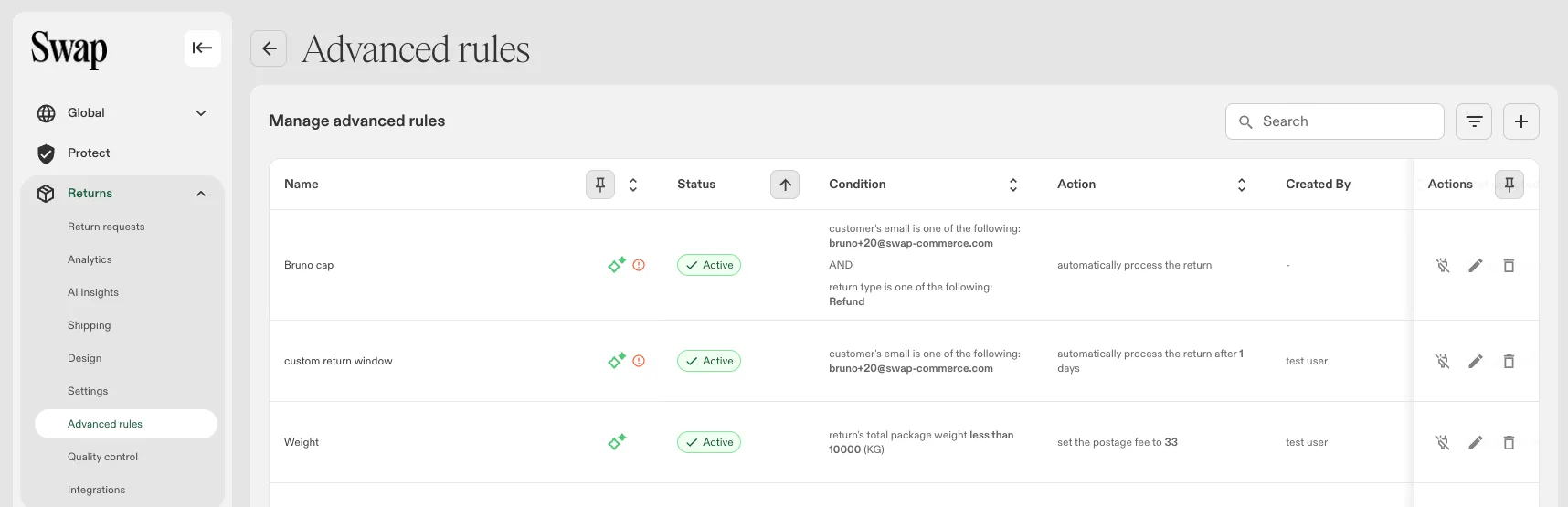
The Advanced Rules table includes AI-generated insights to help you understand and manage your rules more effectively.
Rule description
Each rule displays an AI-generated plain-language summary of what it does — based on its configured conditions and actions. This appears directly in the rule list and helps you quickly understand a rule without opening it.
Conflicting rules
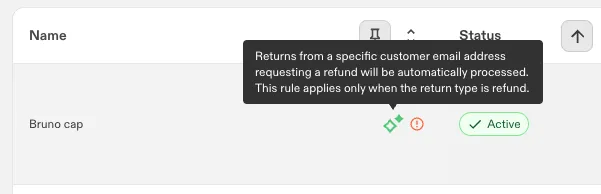
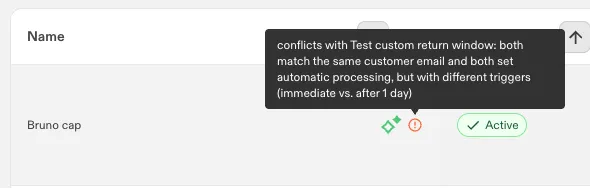
When two or more rules conflict with each other, a warning is displayed on the affected rules. The warning includes an AI-generated explanation of the conflict and an option to remove the conflicting rule directly from the table.
Conditions
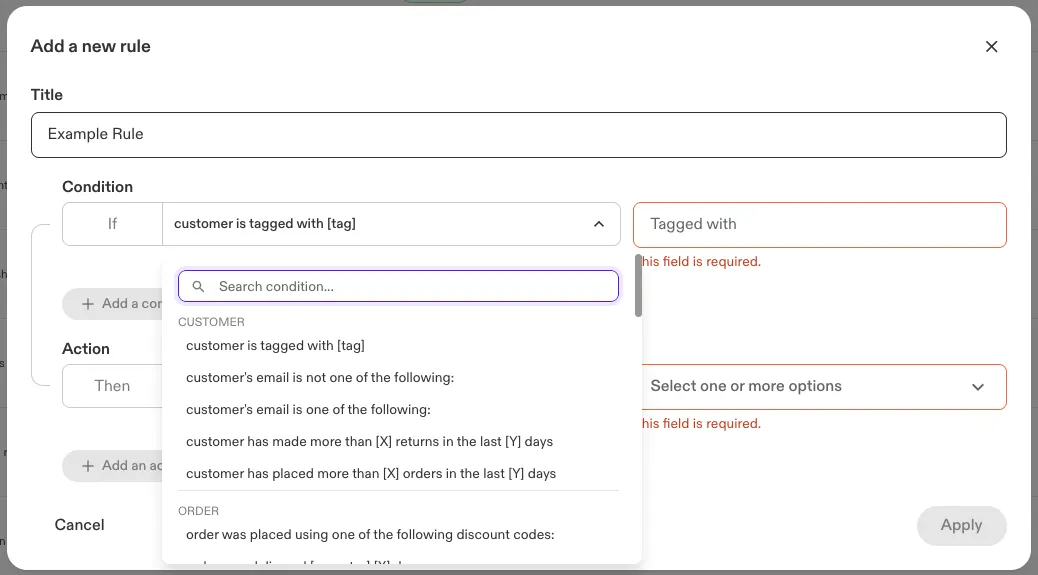
Conditions define when a rule should apply. You can use multiple conditions per rule, joined with AND or OR logic (not both in the same rule).
Customer
Condition | Description |
customer's email is one of the following: | Applies to returns from customers whose email is on the specified list. |
customer's email is not one of the following: | Applies to returns from customers whose email is not on the list. |
customer has placed more than [X] orders in the last [Y] days | Triggers when a customer makes more than X purchases within Y days. |
customer has made more than [X] returns in the last [Y] days | Triggers after a customer exceeds the return threshold. E.g. with "more than 1 return in 1 day": the 1st and 2nd returns are allowed; the rule triggers on the 3rd. |
customer is tagged with [tag] | Applies to returns from customers with a specific Shopify tag. |
Order
Condition | Description |
order was created [operator] [X] days ago | Targets orders created a certain number of days ago. Supports ranges like "greater than." |
order was fulfilled [operator] [X] days ago | Targets orders fulfilled a certain number of days ago. |
order was delivered [operator] [X] days ago | Targets orders delivered a certain number of days ago. |
order was fulfilled between date [X] and date [Y] | Targets orders fulfilled within a specific date range. |
order was delivered between [date X] and [date Y] | Targets orders delivered within a specific date range. |
order was placed between [X] and [Y] days ago | Targets orders placed between X and Y days ago. |
order was placed between [date X] and [date Y] | Targets orders placed within a specified date range. |
order is not tagged with [tag] | Targets orders that do not have a specific tag. |
order is tagged with [tag] | Targets orders that have a specific tag. |
order was placed using one of the following discount codes: | Applies to orders placed with a discount code from the specified list. |
order was placed with a discount code | Applies to orders placed using any discount code. |
order number is in the following list: | Applies if the order number is on the specified list. |
order number is not in the following list: | Applies if the order number is not on the specified list. |
order was paid with a gift card | Targets all orders paid for using a gift card. |
order value [operator] [amount] | Targets orders of a certain value. Supports ranges like "greater than" or "equals." |
order originates from one of the following countries: | Applies to orders shipped from specific countries. |
Return
Condition | Description |
return type is one of the following: | Applies to returns of the types you select. See the exchange-type note below this table. |
return type is not one of the following: | Applies to returns not of specified types. Uses the same list of types as "one of the following," above (confirmed 23 Sep 2026). |
number of items in the return [operator] [number] | Applies based on the number of items being returned. |
return's total package weight [operator] [weight](KG) | Applies based on the total weight of the return package. |
return's total package weight is between [X] and [Y](KG) | Applies based on a weight range for the return package. |
return's shipping status is one of the following: | Applies to returns with a specific shipping status. |
return includes one or more faulty items | Applies when the return includes items marked with a faulty return reason. |
entire order has been returned | Applies when all original items have been returned — whether in one return or across multiple. Does not apply if any original item is marked non-returnable or has not been returned. Exchange items are excluded from this evaluation. |
Return's total value is | Targets returns based on the total value of items being returned. Supports operators such as "greater than" and "equals". Value is in the store's currency. Works with return-level actions. |
return has [X] items tagged with [tag] | Applies when the return contains a set number of items carrying a specific tag. |
return is a warranty / repair return | Applies to returns flagged as a warranty or repair claim rather than a standard return. |
Product
Condition | Description |
item is marked with faulty return reason | Applies to individual line items marked with a faulty reason. |
product SKU is [SKU] | Targets products with a specified SKU. |
product name is [name] | Targets products with a specified name. |
product is tagged with [tag] | Targets products that have a specific tag. |
product is not tagged with [tag] | Targets products that do not have a specific tag. |
product value [operator] [amount] | Targets products of a certain value. Supports ranges like "greater than." |
product purchase price [operator] [amount] | Targets products by their discount percentage: compares a set percentage against the product's price, using compare at price, original price, or variant price as the reference. This is the renamed "Product discount is" condition — see Understanding compare-at price. |
product line item properties include [name] [value] | Applies to line items containing a specific Name/Value property pair. Uses equals logic only. Multiple items in the same order can independently satisfy this condition. |
product metafield [namespace] [key] [operator] [value] | Matches against a product-level metafield value. Configured with a Namespace, Key, Operator (Is / Is not), and Value. |
variant metafield [namespace] [key] [operator] [value] | Matches against a variant-level metafield value. Configured with a Namespace, Key, Operator (Is / Is not), and Value. |
Actions
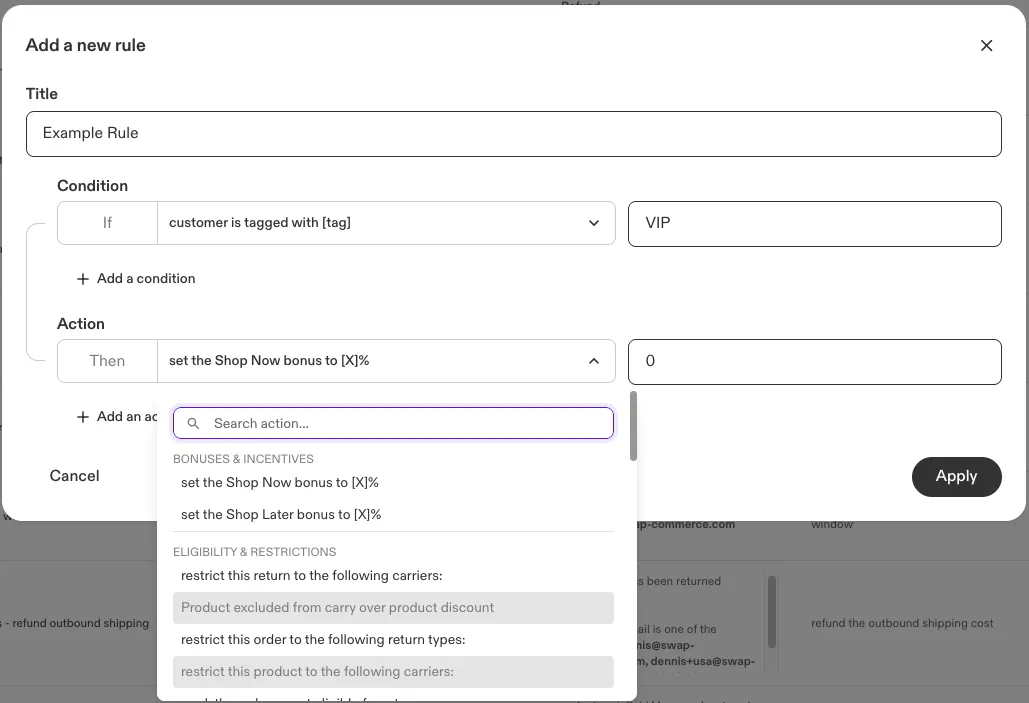
Actions define what happens when the rule is triggered. You can apply more than one action per rule.
Bonuses & incentives
Action | Description |
set the Shop Now bonus to [X]% | Overrides the Shop Now credit bonus percentage. Must be between 0% and 100%. |
set the Shop Later bonus to [X]% | Overrides the Shop Later (gift card) bonus percentage. Must be between 0% and 100%. |
Eligibility & restrictions
Action | Description |
mark the order as not eligible for return | Blocks the return entirely for this order. |
mark this product as not eligible for return | Prevents return of a specific product. |
This Product Is Hidden From The Return List | Hides the product entirely from the returns portal — it does not appear in the return item list and cannot be selected. Use this for items that are non-returnable but where showing an ineligible item would confuse the customer (for example, Protect add-ons or bundle components separated in Shopify for technical reasons). Works with product-level conditions only. |
restrict this order to the following return types: | Restricts the whole order to the return types you select. |
restrict this product return to the following return types: | Restricts a specific product to the return types you select. |
restrict this product to the following carriers: | Restricts eligible return carriers for a product. |
restrict this return to the following carriers: | Restricts eligible return carriers for the whole return. |
Product excluded from carry over product discount | Stops a product-level discount carrying over to the matching exchange item. Applies to Exchange for Something Else exchanges only. Works with product-level conditions only. |
Product excluded from carry over order discount | Stops the order-level discount carrying over to the matching exchange item. Applies to Exchange for Something Else exchanges only. Works with product-level conditions only. |
Order excluded from carry over order discount | Stops the order-level discount carrying over to the exchange as a whole. Applies to Exchange for Something Else exchanges only. Works with order-level conditions. |
Use the three discount-exclusion actions above to prevent double discounting — for example, where a customer bought an item at a discount, the item has since been reduced further, and they then exchange it.
Conditions based on an item's original price or variant price do not work with the exclusion actions, because that price matches the exchange item's price and the discount is always evaluated as 0%. The exclusion actions also do not work with the faulty return reason condition or the product line item properties condition.
If a rule combines an exclusion action with other actions, the whole rule is evaluated against the exchange items rather than the original order's line items, so the other actions on that rule will not behave as expected. Keep exclusion actions on a rule of their own.
For how carry-over discounts are configured and calculated, see Understanding how discounts carry over to exchanges.
Exchange & fulfilment
Action | Description |
set the exchange and fulfilment location to [location] | Chooses which of your store's configured locations (e.g. warehouses or custom locations) fulfils the exchange item and receives the return, from a dropdown of your saved locations. |
deliver to this address: [location] | Overrides where the returned item is shipped, using one of your saved addresses (e.g. a specific returns department or warehouse) instead of the default. |
Fees
Action | Description |
set the return handling fee to [amount] | Adds a fixed handling fee to the return. |
Integrations
Action | Description |
trigger the following webhook: | Sends data to an external system via webhook. |
Portal
Action | Description |
display a message in the portal | Shows a custom message on the portal's first page when the rule's conditions are met. Configure a Title, Text (at least one is required), and an optional background color. The message box matches the width of the items box and text wraps automatically. |
Postage & shipping costs
Action | Description |
set return postage to free | Waives return postage for the order. |
set the postage fee to [amount] | Applies a flat return postage fee. |
calculate the postage fee by multiplying the value by [multiplier] | Increases postage cost by a fixed multiplier. |
apply reduced return postage to this order | Applies discounted postage to the return. |
refund the outbound shipping cost | Refunds the original outbound shipping fee. Applies to refund returns only (not store credit–only returns). When combined with entire order has been returned, refunds once all original items have been returned. |
Processing & status
Action | Description |
mark this item as return not required (green return) | Forces a "return not required" faulty decision on the item — the item does not need to be shipped back and the notification email is sent automatically. Shipping fees are not waived unless a fee waiver action is also included. Instant Exchange is blocked. Works with product-level conditions only. |
mark this item as return required (force faulty flow) | Forces a "return is required" faulty decision on the item. The portal does not display a "faulty" tag; the decision is placed automatically after RMA creation, and the notification email is then sent to the customer. Shipping fees are not waived unless a fee waiver action is also included. Instant Exchange is blocked. Works with product-level conditions only. |
automatically process the return | Approves and processes the return automatically. |
automatically process the return after [X] days | Auto-processes the return after a set number of days. |
change the return RMA status to 'Needs Review' | Flags the return for manual review. |
mark the return as zero value | Marks the return as having zero value for accounting purposes. Takes no further configuration (confirmed 23 Sep 2026 via screenshot). |
mark this product as zero value | Marks a specific product's line item as zero value for accounting purposes. Takes no further configuration (confirmed 23 Sep 2026 via screenshot). |
Return window
Action | Description |
exempt this order from the return window | Ignores return window constraints for the order. |
set the return window between [date X] and [date Y] | Sets a custom return window: either a fixed start and end date, or a rolling preset (last week, last month, last quarter, last year, week/month/quarter/year-to-date). Confirmed 23 Sep 2026 via screenshot. |
set the return window to [X] days | Sets the return window to a fixed number of days. |
set the return window to end on [date] | Sets the return window to close on a specific date. |
Return type classification
In general, if a return contains a refund, it is classified as a refund return — even if it also includes an exchange.
The exception is postage- and processing-related actions. For the following actions, if the return contains at least one exchange item, it is treated as an exchange return for rule evaluation and shipping fee calculation:
- set the postage fee to [amount]
- calculate the postage fee by multiplying the value by [multiplier]
- set return postage to free
- set the return handling fee to [amount]
- automatically process the return
- automatically process the return after [X] days
- change the return RMA status to 'Needs Review'
RMA history
Advanced rule activity
When an Advanced Rule is applied, a note is added to the RMA history:
Advanced Rule: [Rule Name] was applied.
If multiple rules are triggered, each generates its own entry. Repeated evaluations do not create additional entries.