















This article explains how to run an A/B test on your Shop Now bonus amount, comparing it against your current bonus to measure the impact on retained revenue.
🧪 A/B testing for the Shop Now bonus is in beta and not available to all merchants. Contact Swap support to check availability for your store.
Prerequisites
- Shop Now bonus must be enabled. It can be set to 0%, but the setting itself must be turned on — if Shop Now bonus is disabled, the A/B testing toggle is unavailable, with a tooltip explaining why.
How it works
- Returning customers are split 50/50 into two variants: Current — your existing configured Shop Now bonus, shown as-is and not adjustable here — and Test — an alternative bonus percentage you define for the trial.
- Assignment happens per session and does not change for the rest of that session.
- While a trial is running, the bonus amount cannot be changed and advanced bonus rules do not apply.
Setting up a trial
- Go to Returns → Settings, then open the A/B testing tab.
- In the Shop now bonus section, enter the bonus percentage for the Test variant. This field is required.
- Click Start trial.
- The dashboard shows the trial's start date and the date it will end (60 days after starting), along with which day of the trial you're currently on.
- The button changes to Trial running.
- To end a trial early, click Cancel trial and confirm. This stops the trial and adjusts its end date; the change is also recorded in the settings log.
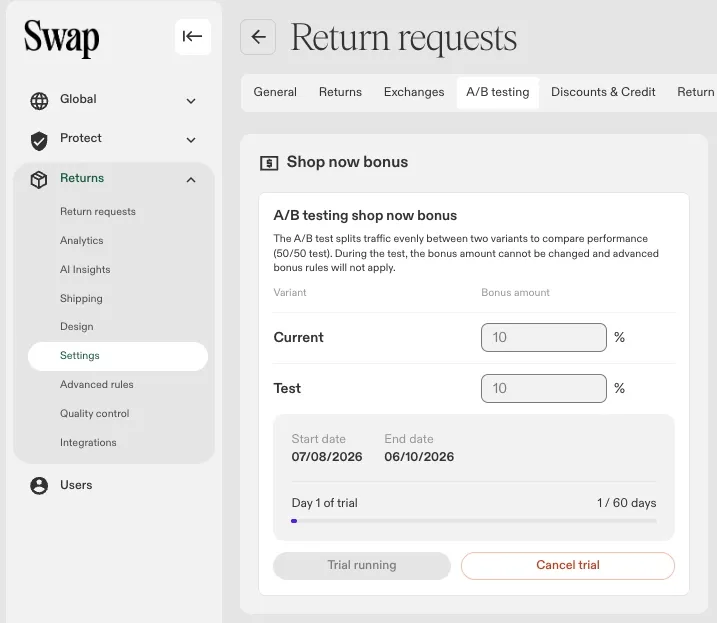
Trials end automatically after 60 days if not cancelled sooner.
How the bonus appears on an RMA
- A standard Shop Now bonus is shown as usual in the RMA tooltip.
- A bonus applied through an A/B test is labelled: A/B testing bonus provided: {currency}X(Y%).
- The bonus amount applied to an RMA is locked in at the time of the return and does not change afterwards, even if the trial's settings are changed later.
Limitations
- Trial results are a comparison between the two variant groups, not a statistically validated experiment. Treat results as directional rather than conclusive.
- Only a 50/50 split is currently supported.
- Result and KPI reporting is not yet available in the dashboard. Trial data is captured for internal analysis, but merchants cannot currently view results in Swap.