
















AI Visibility tests whether AI assistants mention and recommend your store. This article explains what a test measures, how to read a result, and what to do with what it finds.
What a test measures
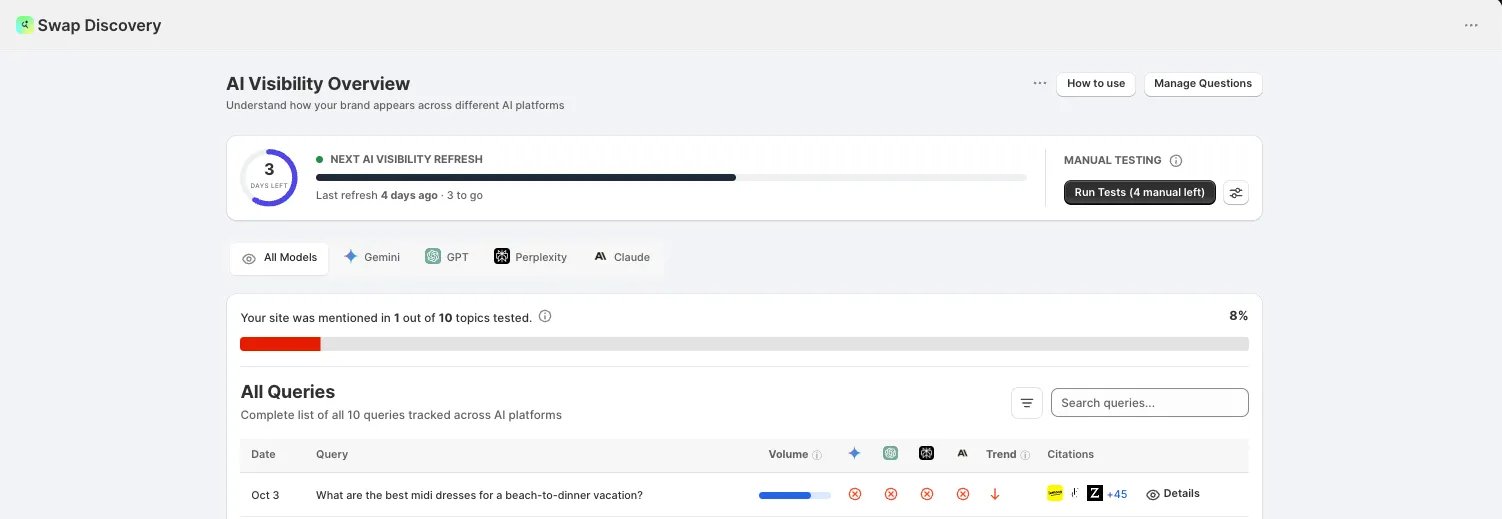
Swap Discovery puts your tracked questions to each AI model and records how your brand fared in the answer. The AI Visibility Overview lists every query with the date it was tested, its Volume, whether each model mentioned you, the Trend against previous tests, and the Citations behind the answer.
Above the table, a summary line tells you how many of your tracked topics your site was mentioned in. A topic counts once if at least one model mentioned you.
Swap Discovery also gives you a single AI Visibility Score with a plain-language rating beside it, broken down by model so you can see which assistants know you and which do not. The score is a percentage, not a search-engine ranking: for each model tested, Swap Discovery works out how often your store was mentioned in answers to your saved prompts, then averages those figures across the models. Treat the score as a tracking number rather than a target — what moves it is the per-model detail underneath.
Because the score averages each model and the summary line counts each topic once, the two figures do not have to match. For example, if one model mentions you for one topic out of ten and the other models do not mention you at all, the summary line reads 1 out of 10 while the score sits below 10%.
A dash in place of the score means there is no completed test to score yet; it does not mean the score is zero. In the same way, a dash or No data against an individual result means Swap Discovery did not receive a comparable value, not that the result was negative.
You can filter the view by model — All Models, Gemini, GPT, Perplexity and Claude — to see where you are recommended and where you are absent, rather than working from a single combined figure. Business is tested against Gemini and ChatGPT, Growth adds Perplexity, Scale adds Claude, and Custom includes all four, with Copilot, Grok and Muse available on request.
Reading an individual query
Click Details on any query to see each model's answer in full, who was cited, and where you appeared.
This is the part worth spending time on. The answer shows you why a competitor was recommended instead of you, which is the thing you can act on. The in-app agent can explain each gap in plain language and recommend what to do about it.
Brand perception
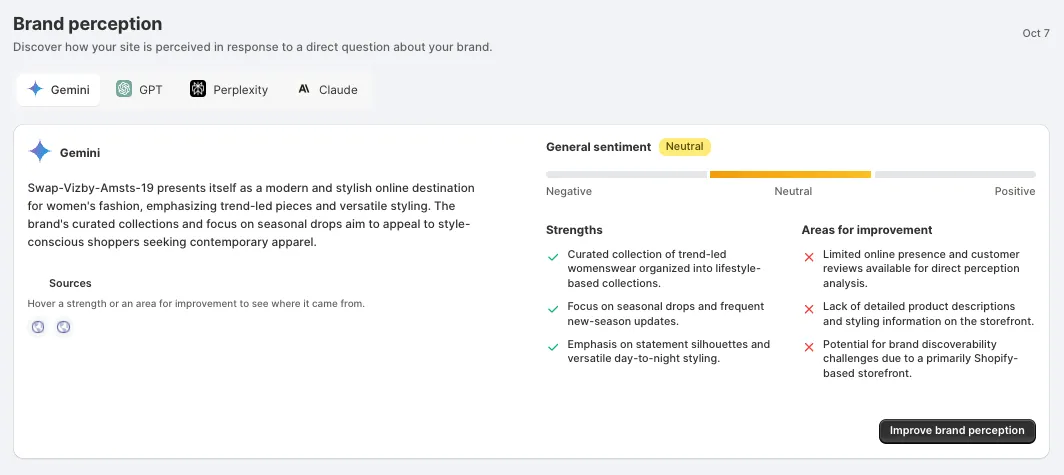
Brand perception shows how your site is described when a model is asked directly about your brand. Select a model to see its answer in full.
Alongside it you get:
- General sentiment, placed on a scale from Negative through Neutral to Positive
- Strengths — what the model credits you with
- Areas for improvement — the gaps it points out
Under Sources, you can hover a strength or an area for improvement to see where it came from, so each point is traceable to the page or review the model drew on.
Because this is reported model by model, you can see where your brand is understood and where it is not. Improve brand perception takes the findings into your action plan.
Competitor Intelligence
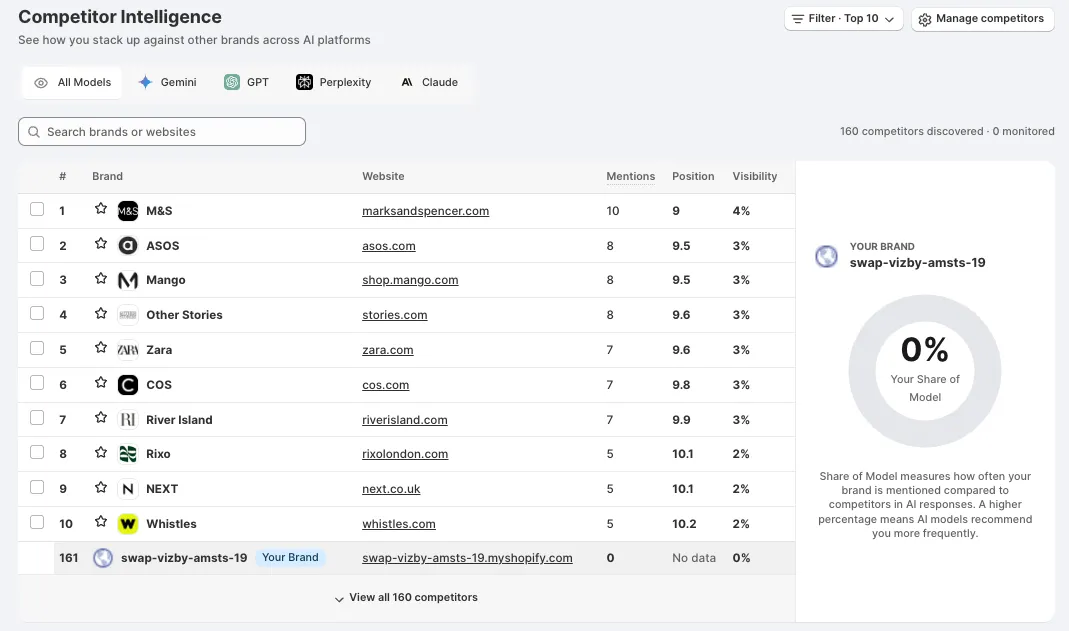
Competitor Intelligence shows how you stack up against other brands across AI platforms. Each brand is listed with its website, Mentions, Position and Visibility, and you can filter by model or search for a specific brand.
Competitors are discovered automatically, and separately from the ones you choose to monitor. The count above the table shows both. Use Manage competitors to decide which ones you want tracked.
Your own store appears in the same list, marked Your Brand, so you can see your position among them directly. Websites and names you add under Other Business Websites and Also Known As in Brand Settings count as your own brand when Swap Discovery evaluates mentions.
Mentions here are counted per model, so a prompt where three models mention a brand counts as three mentions. This is why the figure can be higher than the summary line at the top of the overview, which counts each topic once.
Share of Model is your headline figure. It measures how often your brand is mentioned compared with competitors in AI responses — a higher percentage means models recommend you more often. Read it against the leader rather than on its own.
Citation Intelligence
Citation Intelligence: Where AI Gets Its Answers lists the sites models actually read to answer questions in your category. If you are not on them, you are not in the answer.
Each domain is ranked by Citation Count and classified twice:
- Domain Type — what kind of site it is, such as a marketplace or a resource
- Source Type — what it means for you, such as Competitor for a competitor source, or Collaboration Opportunity for a site that is a potential collaboration or outreach opportunity. These are sources the tested answers returned, not guaranteed placements.
Use Show to switch between All citations, Competitors and Collaboration Opportunities.
The domains that keep repeating matter most. A site appearing across many of your queries is worth more attention than one appearing once.
The prompts behind it
Everything above comes from the prompts you track. Open Your Prompts to see them, edit them and set each one's category. You can edit them at any time, on any plan, up to your plan's prompt limit: 50 on Business, 150 on Growth, 200 on Scale and more than 350 on Custom.
Editing a prompt starts a new tracking history for it, so results for the old wording are not compared with the new one. A new or edited prompt has no results until the next test runs.
Generate with Prompt Lab auto-builds the most relevant questions from what Swap Discovery already knows about your store. Prompt Lab is not included on every plan; if it is locked, the upgrade message names the plan that includes it. Saving Prompt Lab results replaces your current saved prompts rather than adding to them, so review your selection before you save. The same applies to Upload CSV: an import replaces your current prompt set.
The in-app agent can help you choose which shopper questions to track. Tell it which products matter most, which categories you want to win and which competitors you keep losing to.
The most useful prompts are shopper-style questions that describe the problem a customer is solving, the category they are shopping in, and the constraints they care about. Prompts that name your brand show what models say about you today, which helps catch wrong prices, outdated products or a competitor being recommended in your place.
Your first set is generated during setup, where you can edit or replace any of them before your first test — see Getting started with Swap Discovery.
What happens with what it finds
AI Visibility identifies the problem; it does not fix it. Every time a test runs, new action items are generated and added to your Action Plan automatically, so you do not need to generate or refresh it yourself. Items set to Auto-approve are completed automatically, and items set to Review wait for your approval. Action items come out of their own monthly allowance, separate from your visibility tests. Understanding the Action Plan in Swap Discovery covers that.
Where a result points at your catalogue rather than your content — you appear for broad questions but not for specific products — the work happens in Understanding Product Audit in Swap Discovery. And once AI referrals start arriving, Understanding Analytics in Swap Discovery shows what they are worth.
How often tests run
Tests refresh automatically on the cadence your plan includes: weekly on Business, twice a week on Growth and Scale, and daily on Custom. Autopilot is the Continuous Visibility Testing switch in Autopilot Tracking settings, opened from AI Visibility or Action Plan. The overview then shows how long until the next refresh is due. With Autopilot off, there is no scheduled refresh, and the Dashboard shows none.
You can also run a test yourself under Manual testing, using Run Tests. The button shows how much of your allowance you have left.
Scheduled and manual tests share the same monthly allowance of AI answers, set by your plan: 800 on Business, 3,600 on Growth, 6,400 on Scale and more than 42,000 on Custom. When the allowance runs out, a scheduled run is skipped rather than going over your plan limit.
If one model fails during a test, Swap Discovery keeps the results from the models that completed. Retry the test to fill the gap.
Treat your first result as a baseline. A single test tells you little — AI answers vary between runs, so the value is in the direction of travel across repeated tests against the same questions.