
















One-time fixes are setup jobs that only need doing once, but several of them affect everything Swap Discovery does afterwards. This article explains what each one does and what completing it involves.
Where to find them
Your Swap Discovery dashboard carries a checklist of important one-time fixes. New ones are added whenever an opportunity to improve your AI visibility is spotted, so it is worth checking back rather than treating it as finished.
Some items tick automatically when Swap Discovery detects the work. Others tick when you mark them complete.
The in-app agent can walk you through these jobs and tell you which to do first.
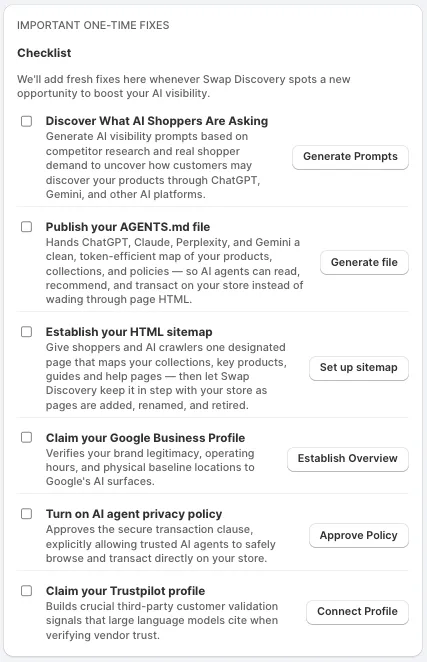
Discover what AI shoppers are asking
Generates shopper-style buying questions based on your store's products and competitor research, helping you explore how customers might discover your brand and products through AI assistants.
Do this one first if your prompts are still the set generated during setup. Everything AI Visibility reports depends on the questions being relevant ones shoppers could ask — see Understanding AI Visibility in Swap Discovery.
Publish your AGENTS.md file
Swap Discovery publishes a machine-readable guide at /agents.md on your storefront. It brings together selected information about your products, collections, pages and policies in a simple text format, giving compatible AI agents another way to understand and navigate your store.
The file is a guide to information. It is not a checkout integration or an access permission, and publishing it does not guarantee that ChatGPT, Claude, Perplexity or Gemini will discover or use it, recommend your products or complete purchases. The filename matches the AGENTS.md convention used for coding agents; here it holds a store guide, and it is not a universally adopted AI shopping standard.
Choose what to include — products, collections, pages, blog posts and contact information — review the generated text, then select Save & publish. Swap Discovery republishes it when you save later changes.
Publishing needs one-time permission to edit your store theme. Without it, the file is saved in Swap Discovery but is not live. The published file is limited to 256 KB, and your plan sets how much content it can include.
Establish your HTML sitemap
Gives shoppers and AI crawlers one designated page mapping your collections, key products, guides and help pages.
You can create a new Shopify page or use an existing one. On an existing page, Swap Discovery keeps the content you wrote and adds or updates only its own sitemap sections. Adding a Sitemap link to a Shopify menu is optional.
Updates are not applied automatically. When your store changes, open HTML Sitemap, select Check for updates, review the added, removed or changed links, then select Apply updates.
Claim your Google Business Profile
Verifies your brand's legitimacy, operating hours and physical locations to Google's AI surfaces. This is an authority signal rather than a catalogue one: it helps establish that you are a real business before a model decides whether to recommend you.
If your business meets Google's eligibility requirements, claim and complete your Google Business Profile. Online-only businesses are generally ineligible, so this is not a required step for every merchant. Swap Discovery checks whether a profile is present, on plans that include this check.
Turn on AI agent privacy policy
The checklist describes this item as approving a secure transaction clause that allows trusted AI agents to browse and transact directly on your store.
The helper gives you editable policy text to copy, and opens Shopify's policy settings so you can paste it in and save it there. Marking the task done in Swap Discovery does not save the policy in Shopify.
The text is a policy statement, not a technical setting. It does not switch on AI checkout, change crawler access or affect platform eligibility.
Read the text before adding it. If you are unsure whether it fits your own legal position, take it to whoever owns your policies.
Claim your Trustpilot profile
Builds third-party customer validation signals that large language models cite when checking whether a vendor can be trusted.
This addresses one of the most common gaps Brand perception reports, covered in Understanding AI Visibility in Swap Discovery: a brand with no independent reviews gives a model nothing to go on beyond the brand's own site.
You claim and manage the profile on Trustpilot. Swap Discovery checks for your Trustpilot presence, on plans that include this check.
What a completed fix means
A checked box is a progress marker. The value comes from the published information or completed setup behind it: the live /agents.md file, the sitemap page on your store, the profile on Google or Trustpilot, or the policy saved in Shopify. Check the destination itself when confirming that a fix is finished.