















Normally, every return submitted through the portal generates its own shipping label and carries its own return fee. Consolidated return label lets a customer add further items to a return they've already started — from the same order, or from another eligible order on their account — so everything ships back on a single label without a second return fee being charged.
This is useful when a customer's order contains items with different outcomes -- for example, a sale item that's only eligible for credit or exchange, alongside a full-price item that's eligible for a refund. Without this feature, the customer would need to submit two separate returns for the same order.
Enabling the consolidated return label
- Open the Returns drop-down in the sidebar.
- Go to Settings.
- Select the Returns tab.
- Locate Consolidated return label and enable it.
- To also allow combining separate orders onto one label, enable Allow multi order returns.
- Click Save.
When active, customers are prompted at the end of the return flow to add further items to the same return.
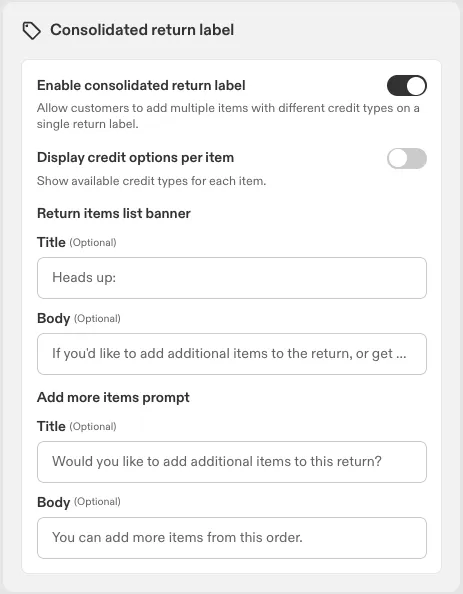
Portal messaging
Two message blocks appear in the portal when the feature is enabled. Both are configurable with a custom title, body text, and background colour.
Message | Default text | Location |
Return items list message | "Heads up: If you'd like to add additional items to the return, or get a refund for one and credit/exchange for another, you'll be able to at the end — once you've selected your first item." | Banner on top of the returns screen |
Add items prompt | "Would you like to add additional items to this return? You can add more items from this order." | Bottom of the final summary screen |
Customer portal experience
- The customer logs in and selects their first item(s) for return.
- They complete the standard return flow -- selecting a credit type, carrier, and submitting.
- On the final page, the “Add items prompt” appears at the bottom. Default: "Would you like to add additional items to this return? You can add more items from this order."
- If the customer selects Yes, add more, they return to the item list. Remaining eligible items from the original order are shown. If no further eligible items exist, the prompt doesn't appear.
- If the customer selects No, I'm done, the return is submitted.
When additional items are added:
- The original label is replaced with a new consolidated label covering all items.
- No additional carrier fee is charged for the subsequent return.
- A new confirmation email is sent to the customer with the updated label.
Adding items from another order
When Allow multi order returns is enabled, the "Add items prompt" also offers the customer's other eligible orders, not just remaining items from the current one.
- If the customer has more than one eligible order, the other orders are listed alongside the current one so they can scroll and choose.
- Selecting a different order replaces the displayed items with that order's items; the original order moves into the order list so the customer can still come back to it.
- Only one order can be actively worked on at a time -- the customer completes the return for the selected order before adding another.
- This can repeat across multiple orders. Each time, the new items are added to the same consolidated label.
- If there are no more eligible orders (or items), the prompt to add more doesn't appear.
How returns are processed
Each item group added to a consolidated return generates a separate RMA, but all RMAs linked this way share the same label and tracking number. Tracking updates apply to all linked RMAs simultaneously.
On the RMA detail page in the dashboard, each linked return shows a Connected to this RMA section listing the other RMAs sharing the label -- including RMA number, order number, and status -- so the full group is visible at a glance. Deleted RMAs aren't included in this list.
When a consolidated label spans multiple orders, it carries every order number in the group (with the usual RF/EX prefix). Supported carriers also print a barcode for each order number at the bottom of the label, so warehouse staff can scan and match items back to the right order.
Barcoding is currently supported on: DHL Express (Domestic and International), FedEx Ground, FedEx International Connect Plus, InPost UK, Royal Mail, UPS Saver, and UPS Standard. Other carriers still support multi-order labels, just without the per-order barcode.
Instant Exchanges are supported -- each RMA charges for its own return items independently.
Limitations
- Split shipments aren't supported on a multi-order consolidated return -- all items across all orders go out on the one label.
- Split shipments generally aren't supported for consolidated returns. All items are assigned to the first item's location.
- If a return label fails, the consolidated return flow continues as normal. If the label is regenerated, the updated label is applied to all linked RMAs.
- The fee from the first return applies to the full consolidated return -- including every order added -- even if a subsequent order would have carried a higher carrier fee.