
















Visual Merchandising is a set of controls in your Swap dashboard for shaping what your storefront agent shows shoppers. You can hide collections you don't want represented, promote the ones the storefront should lead with, influence how products are ordered, and choose how products are pictured.
How the settings are organised
There are four groups of settings:
Group | What it covers |
General | Your defaults. These apply across your whole storefront unless a surface overrides them. |
Homepage | The grid shoppers see when they first arrive. |
Discovery | The frames shoppers move through as they scroll down from the homepage. |
Search | The results returned when a shopper asks for something. |
You don't need to change all your settings if you don't want to. Set your defaults in General and the whole storefront will follow them.
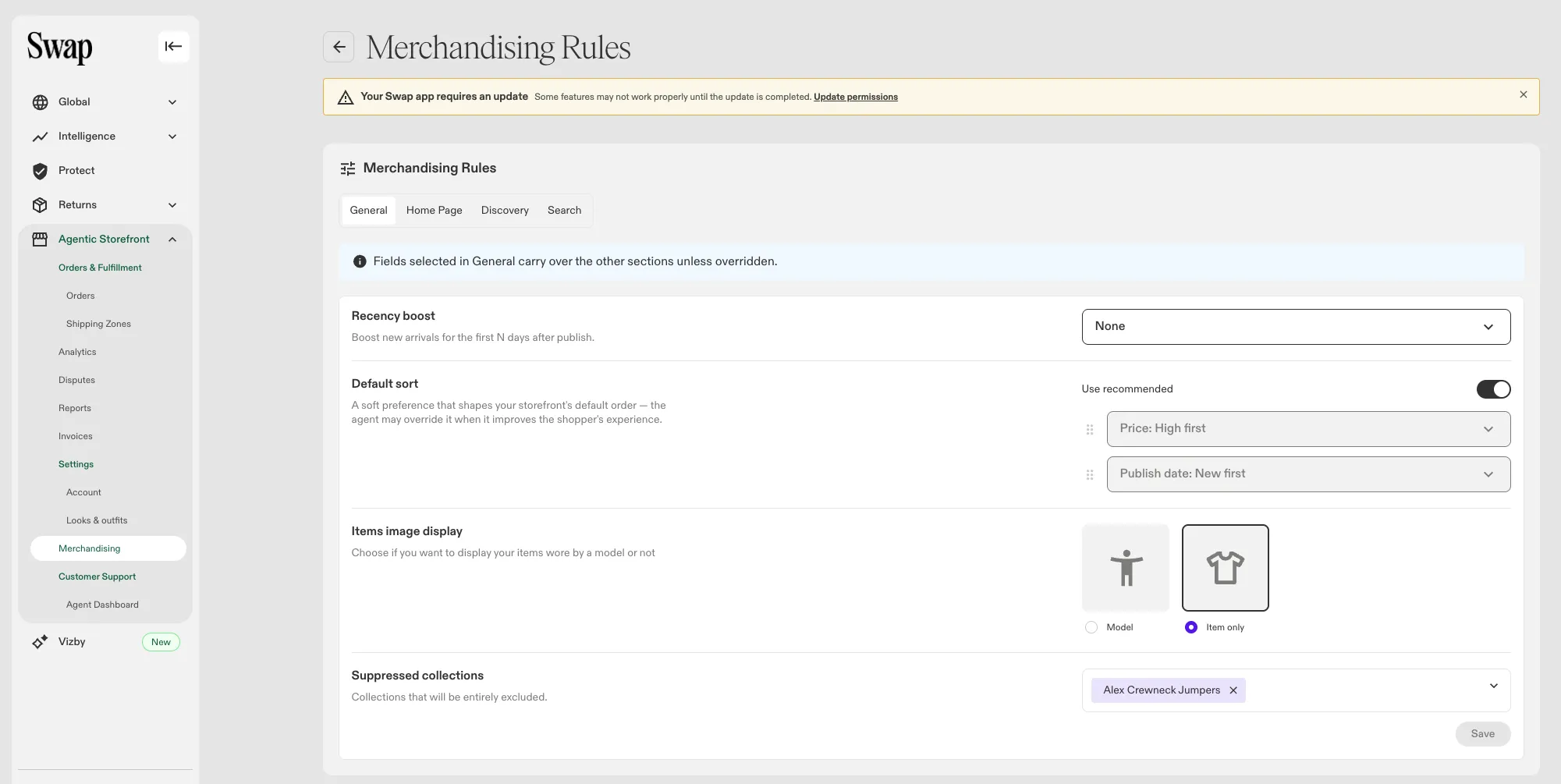
What you can control
Hiding collections
Select any collection from your Shopify catalogue and its products stop appearing in your storefront entirely — not on the homepage, not in discovery, and not in search.
This is the setting most brands reach for first. A clearance collection you don't want the agent surfacing, or an internal collection that was never meant to be public, can simply be switched off.
Promoting collections
Promote the collections you want the storefront to lead with — a new season, a campaign, whatever matters this month.
Promoted means strongly preferred, not exclusive. The rest of your catalogue stays available behind it. If you want the storefront to show your promoted collections and nothing else, hide the rest.
Default ordering
Rank the criteria the storefront should favour when it decides what to show first:
- Publish date — newest first, or oldest
- Price — highest first, or lowest
- Stock availability — favour what you have plenty of
You can also leave ordering on Swap's recommended setting, which is a sensible default if you'd rather not tune it.
A recency boost
Switch on a recency boost and set how many days counts as recent. Anything published inside that window is lifted ahead of your other ordering criteria, so new arrivals can always lead without you having to re-rank everything each season.
How products are pictured
Choose whether products appear as Model shots or Item only shots.
This applies to products where we can identify an image of the type you've chosen. Products without one keep their current image.
Overriding the defaults for one surface
If you want one part of the storefront to behave differently — say the homepage leads with the new season while search stays as it is — open that surface's settings and turn on the override.
You'll get the same controls, pre-filled with your General values, and you can change only what you want. The override stays on until you turn it off, at which point that surface goes back to following General.
When your changes take effect
Changes won't take effect until you save. Once saved, conversations started after that point use your new settings. Conversations already in progress keep the settings they began with, so a shopper mid-session won't have their journey disrupted with sudden changes.
You don't need to ask Swap to re-ingest anything.
What these settings don't do
You're steering the agent, not overriding it. As the agentic storefront runs on a non-deterministic model, these settings are strong preferences that the storefront weighs up, not instructions it follows exactly. You can't guarantee an exact running order for your products.
Relevance comes first when it comes to search. Relevance to what the shopper actually asked carries more weight than any of your criteria. When it comes down to two products that match a request equally well, a product from your promoted collection will outrank the other, but a product that doesn't answer the question won't surface just because your settings favour it. Hidden collections are the exception; those are filtered out outright.
Settings apply to collections, not individual products. You influence the storefront at collection level. There's no pinning or removing single items.