















Swap allows you to calculate return eligibility based on either the fulfilment date or the delivery date of an order. This gives customers a fairer return window, especially for international shipments that take longer to arrive.
This feature relies on the "Delivered" order status provided by Shopify.
You can also configure separate return windows for domestic and international orders.
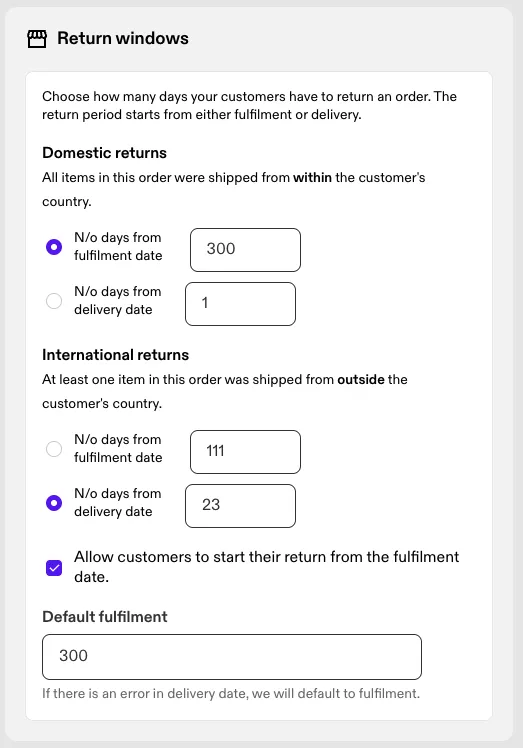
How return windows work in Swap
Swap supports two ways to calculate a return window:
Fulfilled date
- Based on the date the order was fulfilled
- Always enabled and required
- Used as the system fallback
Delivered date
- Based on the date the order was marked as delivered in Shopify
- Can be enabled separately for domestic and international returns
- Falls back to fulfilment if delivery data is unavailable when Allow customers to start their return from the fulfilment date is enabled. This setting is enabled by default

Domestic vs international orders
Swap uses your store’s existing definition:
- Domestic: All items in the order were shipped from locations within the same country as the customer
- International: At least one item in the order was shipped from a location in a different country as the customer
You can configure different return windows for each.
Configuring return windows
- In the Swap dashboard, go to Settings → Returns
- Choose whether each return window should be based on:
- Number of days from fulfilment date, or
- Number of days from delivery date
- Set values separately for:
- Domestic returns
- International returns
- (Optional) Enable Allow customers to start their return from the fulfilment date, which lets a customer start a return from the fulfilment date when the delivered date is missing — either because the order hasn't been delivered yet, or because Shopify holds no delivery data for it. It is enabled by default, and is set separately for domestic and international returns
- Click Save.
If you do not configure a delivery date window, Swap will continue using the fulfilment-based window.
How delivery-based return windows are calculated
When a delivery-based return window is enabled, Swap checks Shopify for delivery information.
If Shopify provides a delivery date
- The return window is calculated using the delivered date
If delivery data is missing or unavailable
- The system automatically falls back to the fulfilment-based return window when it is enabled
- Because that setting is enabled by default, a customer is not normally blocked from returning an order when delivery data is missing. Where it has been turned off, items with no delivered date can't be returned until Shopify supplies one
Delivered status is determined using Shopify’s deliveredAt field on order fulfilments.
Multiple deliveries in a single order
If an order has multiple delivery dates:
- Swap uses the latest delivery date to calculate the return window
Customer experience
Customers are only shown return options when:
- The calculated return window, whether fulfilment or delivery based, is still valid
Once the return window is determined for a session, it does not change mid-flow.
Fallback behaviour and reliability
In any failure scenario, including:
- Missing delivery data
- Shopify API issues
- Invalid configuration
Swap falls back to the fulfilment-based return window, provided Allow customers to start their return from the fulfilment date is enabled.