















Deleting a return in Swap permanently removes the return request from the system, as if it never existed. This is intended for returns still in Pre-transit status. Once a return is marked Delivered, it can no longer be deleted — you'll need to close it instead and process any refund, exchange, or store credit manually in Shopify.
Deleting a return while it is In-transit is possible, but results in losing all associated tracking records and documentation, so only do this if necessary.
Deleting or closing a return
Deleting and closing a return do different things:
- Deleting removes the return and its record from Swap. The customer can then submit a new return for the same items.
- Closing keeps the return and all its data in Swap, but Swap takes no further action on it. The customer can't submit another return for the same items. See How to close a return (Returns V2) [link once live].
Deleting a return
Whether you can delete returns depends on your user role in Swap. If you don't see Delete, ask a user with the right permissions to delete the return for you.
To delete a return, follow these steps:
- In the Swap Dashboard, go to Returns > Return requests.
- Open the RMA you want to delete.
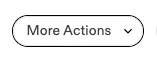
- Click More Actions
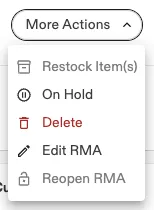
- Click Delete.
- Click Remove to confirm.