














This article explains how Swap handles returns for pre-order items — purchases that a customer has made but that have not yet been dispatched.
Turning on pre-order returns
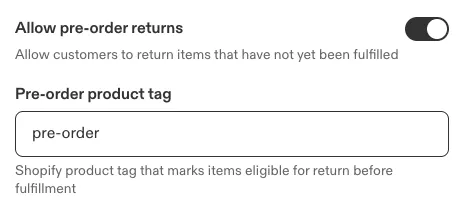
Pre-order returns are controlled by two settings in the Return options card. To find them, go to Returns → Settings → Returns.
- Allow pre-order returns: turn this on to let customers return pre-order items that have not yet been fulfilled.
- Pre-order product tag: enter the Shopify product tag that marks items eligible for return before fulfilment, for example
pre-order. This field can be edited once Allow pre-order returns is on.
How pre-order items are identified
Swap identifies pre-order items using the product tag set in Pre-order product tag. When a customer initiates a return, the system checks each item for this tag and applies pre-order handling accordingly.
Items that are unfulfilled but do not carry the pre-order tag are treated as regular unfulfilled items and are not eligible for pre-order return handling.
A tagged item that has already been fulfilled is returned through the standard process, with a return label and carrier.
What customers experience
Because pre-order items have not been dispatched, customers do not need to send anything back. The return portal reflects this:
- No return label is generated for pre-order items
- No carrier is shown on the return summary screen
- The item is marked as a pre-order in the portal throughout the return flow
The customer receives a refund for the item without needing to arrange a physical return.
Mixed returns
When an order contains both pre-order and regular (fulfilled) items, both can be included in the same return request.
- Pre-order items: no shipping required — no return label or carrier applies to these items
- Regular items: the standard return process applies — a return label is generated and the customer selects a carrier
The carrier selection and return label on the summary screen apply only to the regular items in the return.
Restocking
Pre-order items are automatically unchecked for restocking by default, as the item was never dispatched. Merchants can manually select to restock a pre-order item if needed.
For mixed returns, restocking settings apply to regular items as normal. Pre-order items remain unchecked by default regardless of store restock settings.
RMA and email notifications
The pre-order tag is visible on the RMA for each returned pre-order item.
For returns that contain only pre-order items, the customer still receives a return confirmation email. The pre-order items are listed as not needing to be sent back, and the email contains no return label or carrier details.
For mixed returns, the confirmation email covers the regular items. Return label and carrier information in the email applies only to the regular items in the return.
Exchanges
Exchanges for pre-order items are not blocked by default in the portal. Merchants who want to prevent exchanges on pre-order items can do so using an Advanced Rule.
To block exchanges on pre-order items, create a rule with:
- Condition: product is tagged with [tag], using the same tag as your Pre-order product tag setting
- Action: restrict this product return to the following return types:, selecting only the non-exchange types you want to offer, for example Refund
Advanced Rules apply to pre-order items in the same way as to any other product. For every available condition and action, see Understanding advanced rules.