
















Courtesy credit lets your customers keep an item and get part of its value back, instead of sending it back to you. This article explains how to set it up, how the credit is calculated, and how returns with kept items are processed.
For some items, a return costs more than it recovers: return shipping, handling, inspection, and restocking an item that may not be resold. Courtesy credit lets you offer a smaller refund and skip all of that. The customer gets money back without packing or shipping anything.
To let customers keep an item for a full refund instead, see How to set up green returns (Returns V2).
How it works for your customers
- The customer starts a return in your returns portal and chooses a reason for an item.
- If the item is eligible, the courtesy credit option appears at the top of their return options, with your wording and the credit amount. For example: "Keep it and get £10.00 back".
- If they choose it, the item shows as Keeping it in their return.
- They complete the return as usual. If every item in the return is being kept, they skip the shipping step: there is no label to print and nothing to send.
- Their confirmation screen and email show which items they are keeping, and that they don't need to send them back.
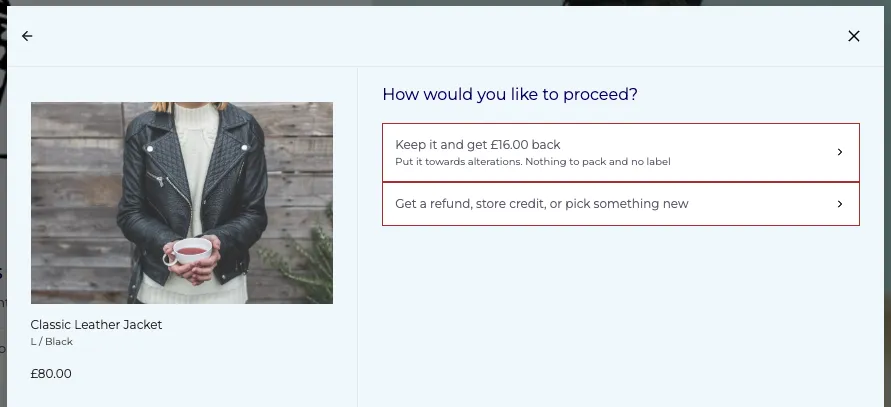
Customers can keep some items and send others back in the same return. They can also keep one unit of an item and send another unit of the same item back.
Set up your default credit
The default credit applies to every eligible product in your store.
- In your dashboard, go to Returns → Settings and open the Discounts & Credit tab.
- Find the Courtesy Credit card.
- Turn on Offer credit to keep the item.
- Under Default credit, choose a Credit type:
- Percentage of item value: for example, 20% of what the customer paid. This starts at 20%.
- Fixed amount: for example, £10.00 per item, in your store currency. This starts at 10.00.
- Enter the Credit value.
- Optional: set Max eligible products per customer. See Limit how many items a customer can keep below.
- Write your Portal title and Portal subtitle. See Write the portal message below.

To offer courtesy credit on specific products only, or to offer a different credit on some products, create targeted rules in Advanced Rules. Those rules also appear on the Courtesy Credit card. See Offer different credits on specific products below.
Write the portal message
The title and subtitle are what customers see on the courtesy credit option in the portal.
Field | Limit | Default text |
Portal title | 60 characters | Keep it and get #{{amount}} back |
Portal subtitle | 200 characters | Put it towards alterations. Nothing to pack and no label |
- Use #{{amount}} wherever you want the credit amount to appear. Click Insert the amount to add it where your cursor is.
- The portal replaces #{{amount}} with the credit for that item, in your store currency.
- Don't type amounts or currency symbols in the title yourself. Use #{{amount}} instead, so the figure is always correct for each item.
- The Portal preview on the right of the card shows how the option will look in your portal, using your brand styles from the Design tab.
Targeted rules use the same portal message, so you can still edit it while Offer credit to keep the item is off.
Offer different credits on specific products
Use Advanced Rules when you want a different credit for some products. For example:
- 50% on a hard-to-resell category, such as swimwear
- a fixed £5.00 on low-value accessories
- a credit only on products with a certain tag, while the default credit is off
Create a courtesy credit rule
- Go to Advanced Rules and create a new rule.
- Add at least one condition to choose which products the rule covers. For example, a product tag or collection.
- Add an action from the Courtesy credit category:
- offer [X]% of the item value as courtesy credit to keep it
- offer [amount] as courtesy credit to keep the item
- Save the rule.

All of your courtesy credit rules are listed under Targeted rules on the Courtesy Credit card. You can see each rule's credit, its conditions, and whether it is inactive. To edit a rule, go to the Advanced Rules page.
Targeted rules work whether Offer credit to keep the item is on or off. To offer courtesy credit on specific products only, leave the toggle off and create a rule for those products. Only products that match a rule are offered courtesy credit.
For more on building rules, see Understanding advanced rules (Returns V2).
Rules to know
- Courtesy credit must be the only action in the rule. To do something else for the same products, create a separate rule.
- A rule needs at least one condition. The default credit already covers every product, so rules are for targeting.
- Conditions that depend on the whole return can't be used. The offer is shown before the customer has finished building their return, so conditions such as the return's total value or the number of items in the return aren't available. In the editor, the courtesy credit actions are disabled when one of these conditions is selected.
Which credit applies
Situation | What the customer is offered |
A product matches a targeted rule | The rule's credit, even if it is lower than the default |
A product matches more than one targeted rule | The highest credit among those rules |
A product matches no rule and the toggle is on | The default credit |
A product matches no rule and the toggle is off | No courtesy credit |
How the credit amount is calculated
The credit is calculated per unit, from the price the customer paid for the item after discounts.
Credit type | How it's calculated | Example |
Percentage | Item price × percentage | 20% of a £45.00 item = £9.00 |
Fixed amount | The fixed amount, but never more than the item price | £10.00 on a £45.00 item = £10.00; £10.00 on an £8.00 item = £8.00 |
- If the customer keeps more than one unit, the portal shows the credit multiplied by the quantity. For example, keeping 2 units at £9.00 each shows £18.00.
- Amounts are rounded to 2 decimal places.
- Tax and duties are not refunded on top of the credit. The credit is the full amount the customer receives for that item.
- A percentage can't be more than 100%. A fixed amount must be more than 0, with at most 2 decimal places.
Limit how many items a customer can keep
Use Max eligible products per customer to stop the same customer from keeping too many items over time.
- It is a lifetime limit for your store, counted by customer email address.
- It counts units. Keeping 2 of the same T-shirt uses 2 of the allowance.
- Items on returns that were deleted, reset or never submitted don't count.
- Once a customer reaches the limit, the courtesy credit option no longer appears for them. If an item's quantity would take them over the limit, the option isn't shown for that item.
- Leave the field empty for no limit.
When the option isn't offered
Customers don't see the courtesy credit option when:
- the product isn't covered by your default credit or by a targeted rule
- the customer has reached their limit
- the item is being returned as faulty, whether the customer chose a faulty reason or one of your rules marked it as faulty (see Getting started with Faulty Flow (Returns V2))
- the return is a warranty claim
- the item had a zero value, such as a free gift
- the item is a pre-order that hasn't been fulfilled yet
- the item is one part of a Shopify set (bundle). Customers can keep the whole set, but not one piece of it.
Courtesy credit can't be combined with some other options:
- Exchange for the same item: a kept item can't also be exchanged. Other items in the same return can still be exchanged.
- Instant exchange: not available when the customer is keeping every item in the return, because nothing is being sent back to secure the exchange. See Understanding Instant Exchanges (Returns V2).
Courtesy credit can be used with Shop Now: the customer can put the credit towards new products. See Understanding Shop Now and Shop Later (Returns V2).
Managing returns with kept items
Returns with kept items appear in your returns list like any other return.
In the return (RMA) view
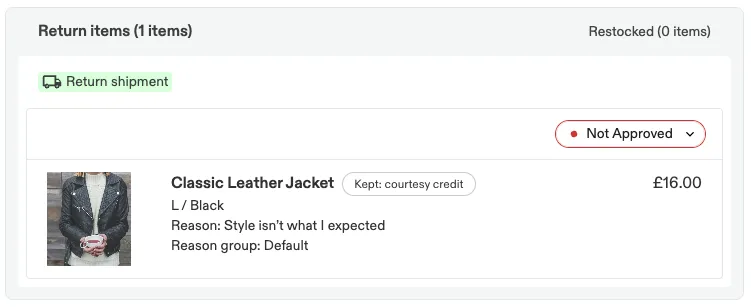
- Each kept item has a Kept: courtesy credit badge. Hover over it, or tab to it, to see the credit per unit.
- Return details show the Courtesy credit total on a separate line from the returned items.
- Kept items have no quality control (QC) status and no restock option, because they never arrive back.
- Kept items don't hold up processing based on QC results. When the rest of the return is processed automatically after QC, kept items count as passed.
If every item in the return is kept
- No shipping label is created, and Regenerate label is disabled with the message "No label needed: items are kept for courtesy credit".
- The customer gets their confirmation email straight away.
- Process the return through your usual flow, manually or with your auto-processing rules, to issue the credit.
Inventory and warehouses
- Kept items are never restocked.
- If you use one of Swap's warehouse integrations (ShipBob, Mintsoft or Bleckmann), kept items are not sent to your warehouse system. If every item is kept, no warehouse return is created.
- Kept items are left off the shipping label and customs paperwork for anything that is sent back.
Shopify
- The credit is refunded as an amount. Kept items are not marked as returned line items in Shopify, so Shopify doesn't restock them.
Refunds, fees and shipping
All items kept | Some items kept, some sent back | |
What the customer gets for each kept item | The courtesy credit | The courtesy credit |
Tax and duties on kept items | Not refunded | Not refunded |
Return shipping cost | None | Charged as normal for the items sent back |
Handling fee | None | Charged as normal. Kept items don't add to item-based fees. |
Original order shipping refund | Not given, so it is still available if the customer makes a later return that ships | As normal |
How the customer is paid | Straight to their original payment method, if refunds are allowed. Otherwise they choose from your usual options, such as store credit. | They choose from your usual options |
The handling fee rules apply to the handling fee set in your settings as well as to fees set by Advanced Rules. For how the fee works, see Understanding the return handling fee (Returns V2).
On a gift return, the customer always sees your usual payout options, even when every item is kept.
Emails and Klaviyo
Return confirmation email
- Kept items show a Kept: courtesy credit badge.
- A Courtesy credit line shows the total credit.
- If every item is kept, the email says: "There's nothing to send back, so we'll process your return for the items you're keeping."
Klaviyo
If you send return emails through Klaviyo, each item in the return event includes:
Property | Value for a kept item |
|
|
| The credit for that item |
|
|
You can use these properties to change the wording of your Klaviyo templates for kept items.
FAQ
Can a customer keep only some of the items in their return?
Yes. They choose courtesy credit item by item. Items they keep don't need to be shipped. Everything else follows your normal return process.
I set a targeted rule with a lower credit than my default. Which one applies?
The targeted rule. A matching rule always replaces the default for that product, even if its credit is lower.
Can I offer courtesy credit on only a few products?
Yes. Leave Offer credit to keep the item off and create targeted rules for those products. The per-customer limit only applies while the toggle is on.
Is the credit ever more than the customer paid?
No. A percentage can't be more than 100%, and a fixed amount is reduced to the item's price if the item cost less.
What happens if I change my settings while a customer is partway through a return?
The customer's offer is checked again when they submit. If it has changed, they see a message asking them to remove the item and add it again, and the portal shows them the updated offer.
Does a kept item count as returned in Shopify?
No. The credit is refunded as an amount, and the item is not marked as returned or restocked.
Will kept items show up in my warehouse?
No. Kept items are not sent to ShipBob, Mintsoft or Bleckmann, and no warehouse return is created when every item is kept.
Can customers keep a faulty item?
Not through courtesy credit. Items returned with a faulty reason follow your faulty item process instead.