
















This article explains how to set or change return shipping fees in the Swap dashboard, and how to configure fees to be charged as a separate additional payment instead of being deducted from the customer's refund.
Setting or changing the fees
- Go to your Swap Dashboard.
- Open the Returns drop-down menu.
- Click Shipping.
- Under Domestic carriers, locate the carrier whose fees you want to change and click Settings.
- Open the shipping region you want to update.
- Adjust the fees for refunds, exchanges, and credit as needed.
- Click Save.
For international carriers, repeat the same process under the International carriers section. Make sure you select the correct region by checking the countries listed within it before making changes.
Charging shipping fees as a separate payment
By default, return shipping fees are deducted from the customer's refund or credit amount, which reduces the amount they receive back. The Charge shipping separately setting changes this: the customer receives their full refund or credit and is charged the shipping fee as a separate payment.
Why use this setting?
- Prevents the order from being recorded as partially refunded in Shopify. When shipping fees are deducted from the refund, the customer does not receive the full product price back, so Shopify sees a partial refund rather than a full one — this can affect reporting and downstream workflows.
- Keeps refund and shipping fee transactions separate, simplifying accounting.
To enable the setting:
- Go to your Swap Dashboard.
- Open the Returns drop-down menu.
- Click Settings.
- Open the Returns tab.
- Find the Shipping fees card.
- Turn on Charge shipping separately.
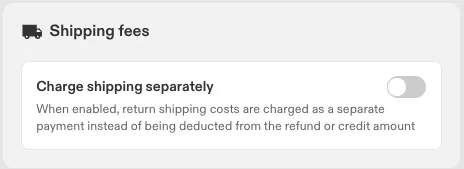
The setting is disabled by default. Once enabled, it applies to all return shipping fees charged through the portal.