














This article explains how to run an A/B test on your Shop Now bonus amount, comparing it against your current bonus to measure the impact on retained revenue, and how to download the results.
Prerequisites
- Shop Now bonus must be enabled. It can be set to 0%, but the setting itself must be turned on — if Shop Now bonus is disabled, the A/B testing toggle is unavailable, with a tooltip explaining why.
How it works
- Returning customers are split 50/50 into two variants: Current — your existing configured Shop Now bonus, shown as-is and not adjustable here — and Test — an alternative bonus percentage you define for the trial.
- Assignment happens per session and does not change for the rest of that session.
- While a trial is running, the bonus amount cannot be changed and advanced bonus rules do not apply.
Setting up a trial
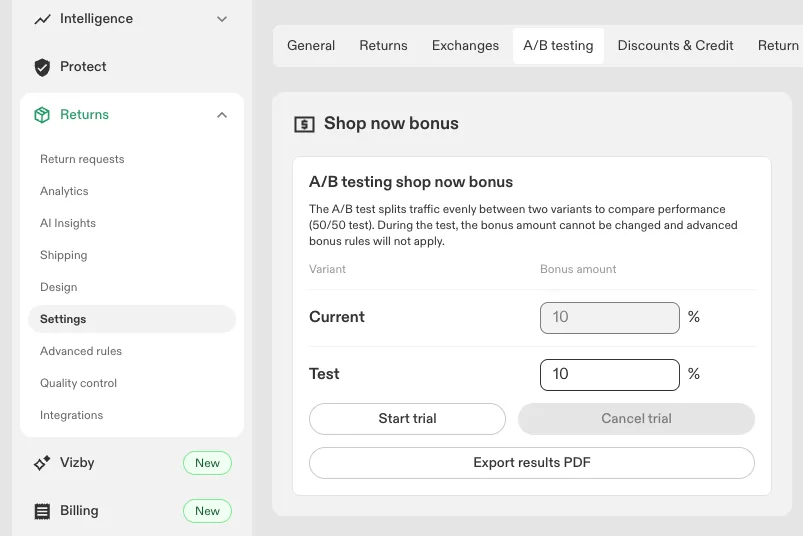
- Go to Returns → Settings, then open the A/B testing tab.
- In the Shop now bonus section, enter the bonus percentage for the Test variant. This field is required.
- Click Start trial.
- The dashboard shows the trial's start date and the date it will end (60 days after starting), along with which day of the trial you're currently on.
- The button changes to Trial running.
- To end a trial early, click Cancel trial and confirm. This stops the trial and adjusts its end date; the change is also recorded in the settings log.
Trials end automatically after 60 days if not cancelled sooner.
Downloading your test results
You can download the results of your latest trial as a PDF report.
- Go to Returns → Settings, then open the A/B testing tab.
- In the Shop now bonus section, click Export results PDF.
The button is available as soon as a trial starts and stays available after it ends, so you can download the report again later. The report always covers your latest trial: while the trial is running, it covers the returns so far; once it has ended, it covers the whole trial.
The report is only created once the latest trial has at least 30 finished returns in each variant (Current and Test). Until then, the export shows a message explaining that more returns are needed.
What the report shows
In the report, the Current variant is called control and the Test variant is called test. The report includes:
- Verdict: a plain-language summary of which group is ahead on retained revenue per return after subtracting the bonus paid, how Shop Now adoption compares, whether the result passes a confound check, and whether the differences are statistically significant.
- Returns per group: how many returns were assigned to each group, and how many of those customers saw the bonus offer.
- Bonus values per variant: the Shop Now bonus offered to each group, alongside the store credit and Shop Later bonuses customers were offered.
- KPI summary per variant: number of returns, total retained revenue, retained revenue via Shop Now, and Shop Now adoption rate.
- Bonus cost per variant: how many customers used the bonus, the total bonus paid, and the average bonus per return.
- Headline charts: retained revenue per return, overall and via Shop Now, with and without the bonus cost subtracted.
- Is the difference real, or noise?: a statistical check on adoption rate and retained revenue per return, with the difference, a 95% confidence interval and a p-value. A difference counts as significant when p is below 0.05.
- Retention mix per variant: where retained revenue came from, per return: Shop Now, other exchanges, store credit, or gift card.
The confound check matters because the test only changes the Shop Now bonus. Both groups should be offered the same store credit and Shop Later bonuses. If those differ between the groups, part of the difference in retained revenue may come from them rather than from the Shop Now bonus.
The report only counts finished returns where the customer reached the return outcome page and saw the Shop Now offer. Returns where every item was exchanged, with nothing refunded or credited, are left out, because the customer never saw the offer.
How the bonus appears on an RMA
- A standard Shop Now bonus is shown as usual in the RMA tooltip.
- A bonus applied through an A/B test is labelled: A/B testing bonus provided: {currency}X(Y%).
- The bonus amount applied to an RMA is locked in at the time of the return and does not change afterwards, even if the trial's settings are changed later.
Limitations
- The results report checks whether the differences between the groups are statistically significant. When they are not, treat the results as directional rather than conclusive.
- Only a 50/50 split is currently supported.
- Results are available as a downloadable PDF only, not as a page in the dashboard.