














Configure Swap to automatically close inactive return requests after a set number of days in a specified shipping status, with no refund or Shopify action triggered.
Return requests (RMAs) that remain inactive in a specified shipping status can be closed automatically after a set number of days. Closing an RMA this way does not trigger a refund, and no processing or restocking action is sent to Shopify.
Automatically closed RMAs are marked as such in the RMA table.
Setting up automatic closure
- Go to Returns → Settings and open the Returns tab.
- Find the Automatic RMA closure card and turn on Automatically close dormant RMAs.
- Under Closure rule, complete the sentence Close RMA if dormant in [shipping status] shipping status for [number] days:
- Select one or more shipping statuses, for example Return to store. An RMA in any of the selected statuses qualifies for closure.
- Enter the number of days the RMA must stay in that status before it is closed.
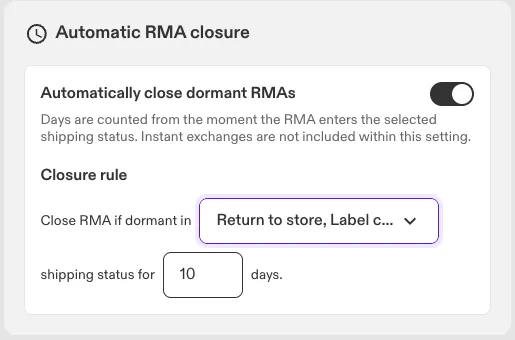
Days are counted from the moment the RMA enters the selected shipping status. Once that period has elapsed, the RMA is closed automatically.
RMAs excluded from automatic closure
Instant exchanges are not included in this setting, so an instant exchange RMA is never closed automatically.
The following RMA statuses are not eligible for automatic closure:
- On-hold
- Needs review
- Pending