
















This article shows you how to give Swap your CPSC answers for each product in Compliance Hub, so Swap can add them to your US commercial invoices.
| 🇺🇸 This article applies to merchants shipping consumer products into the United States. Your answers only appear on invoices for US shipments.
The CPSC Product Registry card is being switched on store by store. If you don't see it in Compliance Hub yet, ask your Account Manager.
Before you start
- Your products need full 10-digit US HTS codes. Swap can't check products that don't have a 10-digit code. If any of yours don't, add the codes first using Fix codes or the HS code opt-in in Compliance Hub. The data checklist explains how to get real 10-digit codes.
- You need to know your answer for each product. Swap can't decide for you whether a product is regulated. If you're unsure, check CPSC's guidance or ask your customs broker. The main eFiling guide covers how the rules work.
How it works
For each product, you give Swap your answer. For example, "this product is outside CPSC's jurisdiction", or "here is the certificate I registered with CPSC". Swap records your answer and adds it to your commercial invoices.
Everything happens on the CPSC Product Registry card in Compliance Hub. You can confirm many products in one go.
Which option applies to your products
Your products | What to do |
None are on CPSC's list | Nothing is required. You can still confirm Disclaim A for the products Swap suggests (see below) — whether a product is outside CPSC's jurisdiction is your decision, and confirming can help parcels clear faster. You don't need a CPSC account. |
On CPSC's list, with a CPSC certificate (often children's products) | Connect your CPSC registry (see below). |
Adult clothing on CPSC's list that qualifies for the flammability testing exemption | Confirm Disclaim B, by spreadsheet (see below). |
On CPSC's list with no certificate, and not adult clothing (for example jewellery) | There's no disclaimer for these in Swap. Check what the product needs with your customs broker or CPSC's guidance before it ships. |
No 10-digit US HTS code yet | Add the code first (see Before you start). |
Not sure which applies | Check CPSC's guidance or ask your customs broker before you confirm anything. |
How to confirm Disclaim A
Disclaim A says a product is outside CPSC's jurisdiction. Whether that's true of your product is your decision. Swap suggests products whose HTS code isn't on CPSC's list. You don't need a CPSC account.
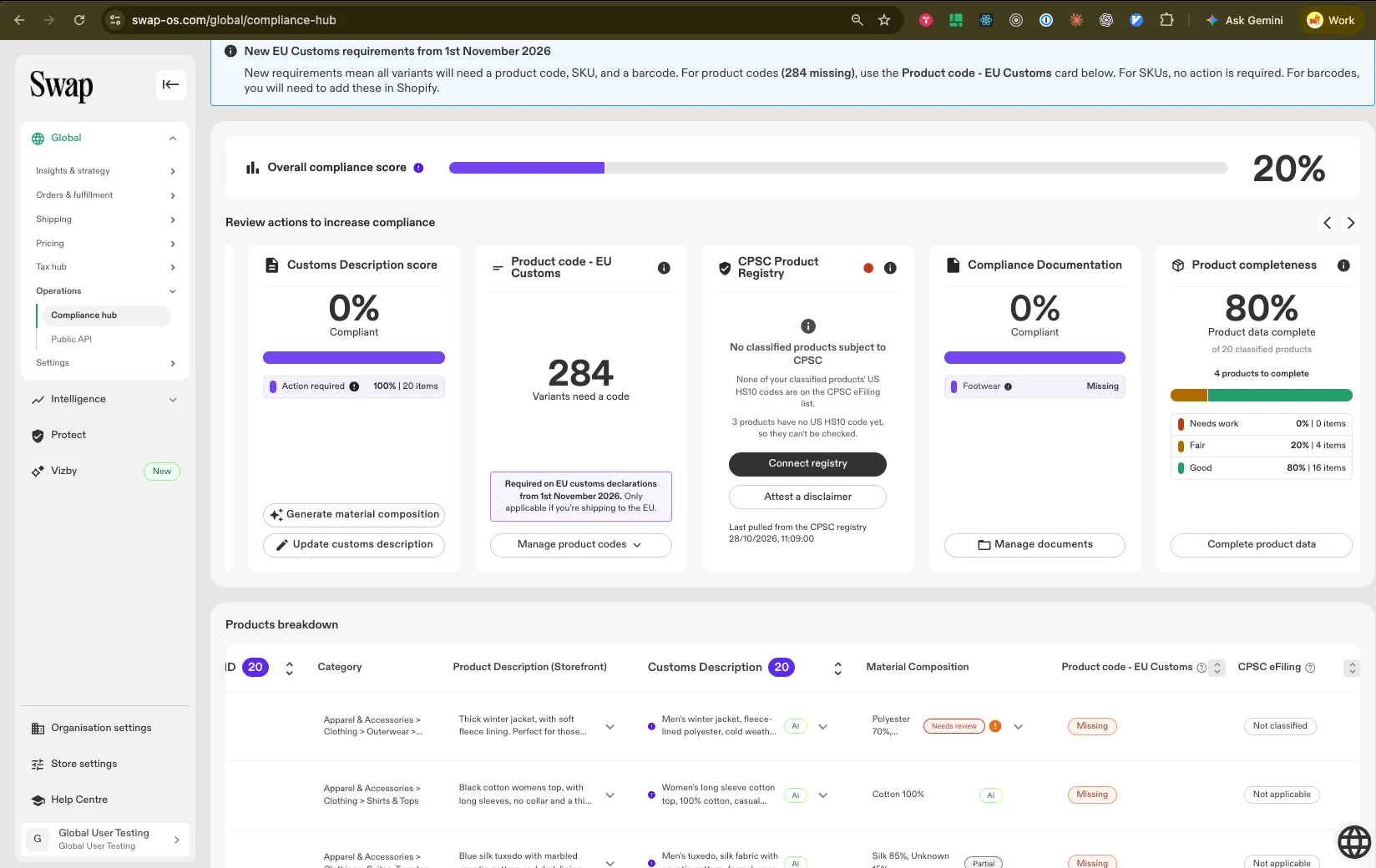
- In Compliance Hub, open the CPSC Product Registry card.
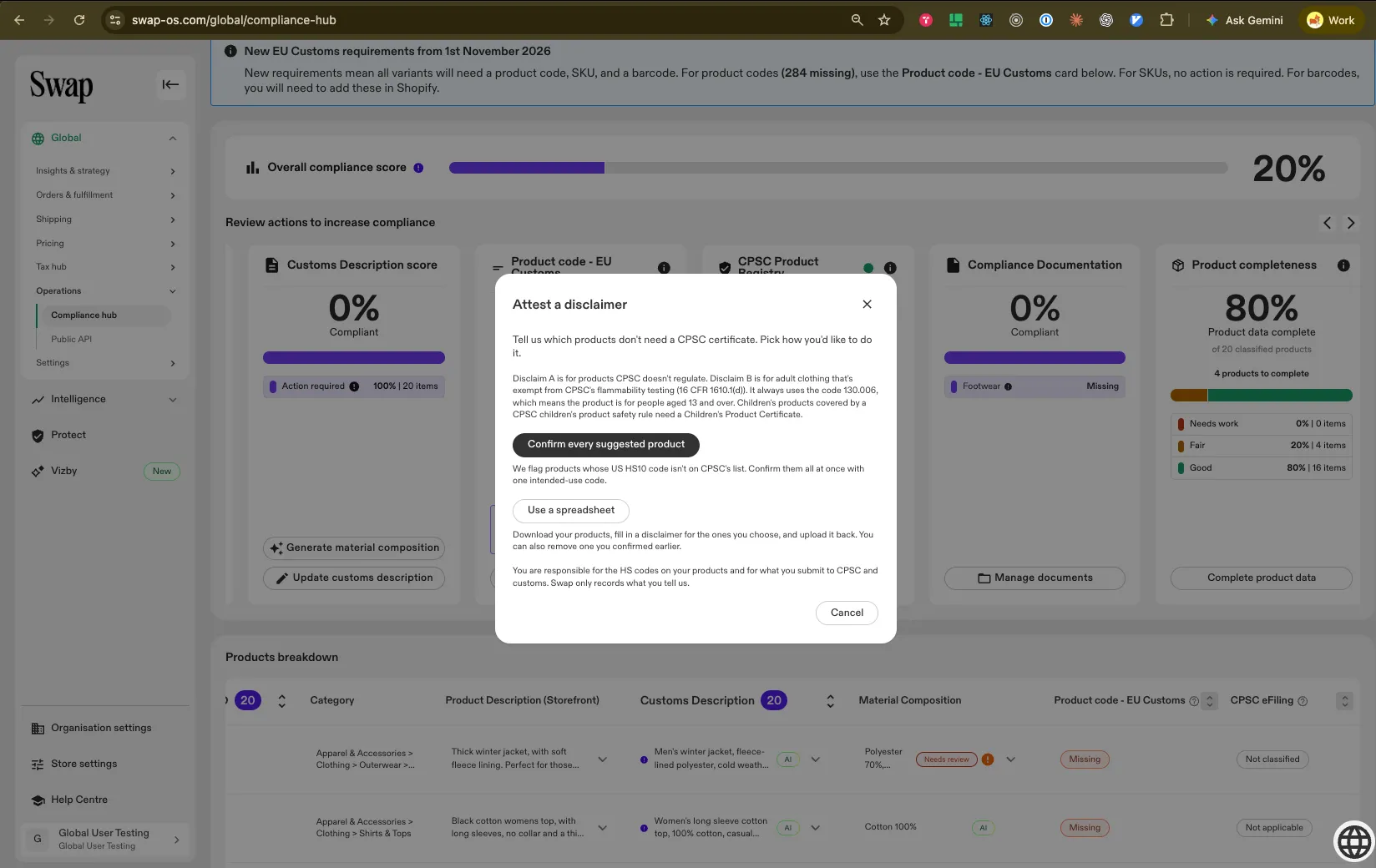
- Click Attest a disclaimer.
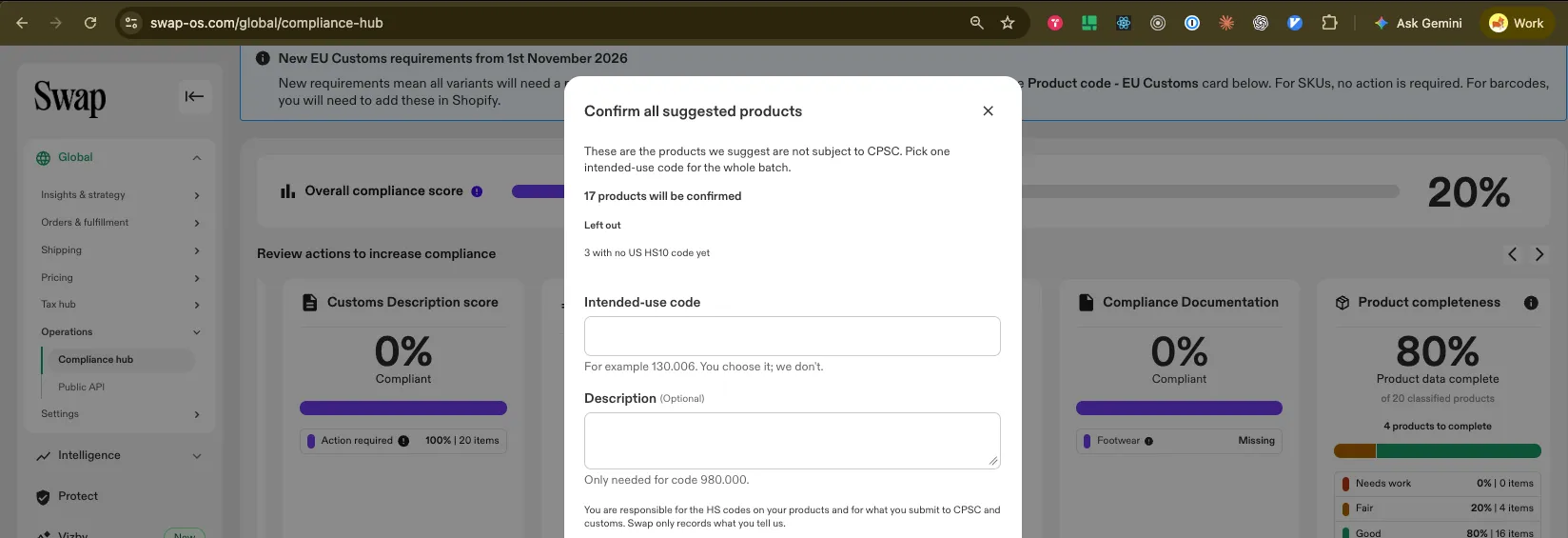
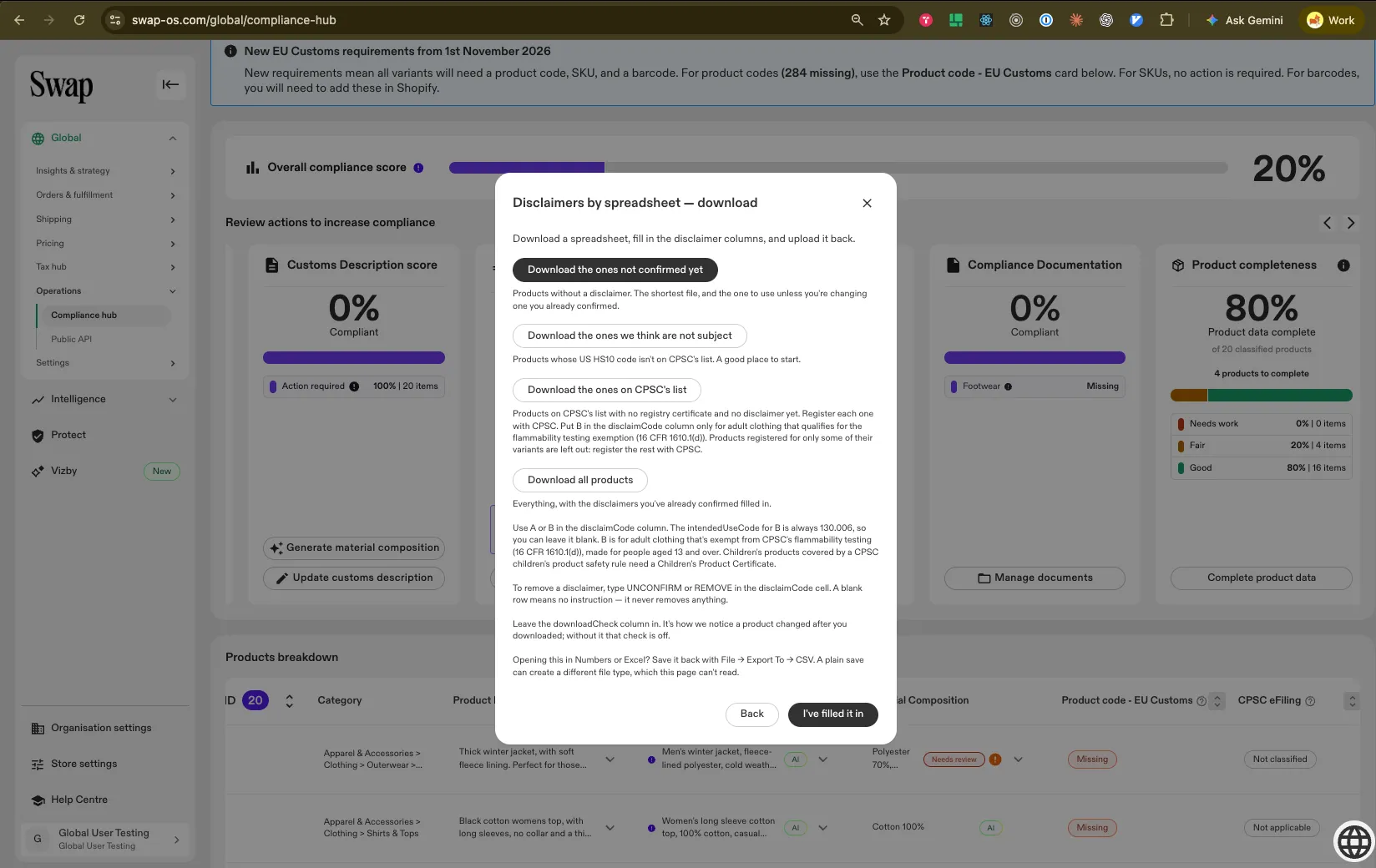
3. Choose how to confirm your products: confirm all the suggested products at once (review the list first, because confirming is your declaration that the answer is right for each product), or download the spreadsheet, fill it in, and upload it back — see the spreadsheet rules below.
4. Enter an intended-use code, which says who the product is for. You choose the code. Swap can't suggest one. If you're unsure, check the CBP list of intended-use codes (PDF), CPSC guidance, or your customs broker. If you use code 980.000, you also need to add a short description of the product's use.
5. You'll be asked to confirm that your product is outside CPSC's jurisdiction. Read each statement on screen before you confirm, then tick both boxes: the general confirmation and the Disclaim A statement.
Spreadsheet rules
- If the file has any error, Swap rejects the whole file and saves nothing. Fix the rows Swap shows you, then upload the file again.
- Every size and colour of a product needs the same answer.
- A product that already has a CPSC registry reference can't be disclaimed, because Swap uses its certificate instead.
- If a product changes after you download the spreadsheet, download a fresh copy.
How to confirm Disclaim B
Disclaim B is for adult clothing on CPSC's list that qualifies for the flammability testing exemption. It isn't for all adult clothing. Whether a product qualifies depends on the fabric of each product, not its category, so two items in the same collection can have different answers.
A garment can use Disclaim B if it is intended for people aged 13 or older, contains no button or coin cell batteries, and is made entirely from fabric that is either:
- plain-surface fabric weighing 2.6 oz/yd² or more, or
- acrylic, modacrylic, nylon, olefin, polyester or wool, or a combination of those fibres, at any weight.
Lightweight plain-surface fabrics, such as thin silk or cotton under 2.6 oz/yd², don't qualify. Products made from them need a CPSC certificate instead. See how to connect your CPSC registry below.
Disclaim B exempts a garment from testing. It doesn't mean the product is outside CPSC's rules. The garment must still meet the flammability standard (16 CFR Part 1610).
The main eFiling guide explains the exemption. If you're not sure whether a product qualifies, check with your customs broker before you confirm it.
Disclaim B is confirmed by spreadsheet only:
- On the CPSC Product Registry card, click Attest a disclaimer and use the spreadsheet. Download the ones on CPSC's list is a good place to start.
- Put B in the disclaimCode column. The intended-use code is always 130.006, or can be left blank.
- Upload the file, read the Disclaim B statement on screen, and tick it.
- If you're confirming more than one Disclaim B product, a review screen lists every product and SKU — confirm you've reviewed them all.
Disclaim B is only accepted for products on CPSC's list, and the spreadsheet rules above apply.
How to connect your CPSC registry to Swap
Use this if you have products with a CPSC certificate. Connecting lets Swap read your certificate details. Swap only reads from CPSC. Swap never creates or changes your certificates.
- In your CPSC account at efiling.saferproducts.gov, create an API token and its secret. The key must be for one CPSC account — the one that holds your certificates.
- In Compliance Hub, open the CPSC Product Registry card and click Connect registry.
- Paste your API token and its secret.
- Check the card. It shows which products still need a certificate.
- If a product is missing a certificate, click Go to CPSC and fix it there. Then click Pull from CPSC registry to refresh the card.
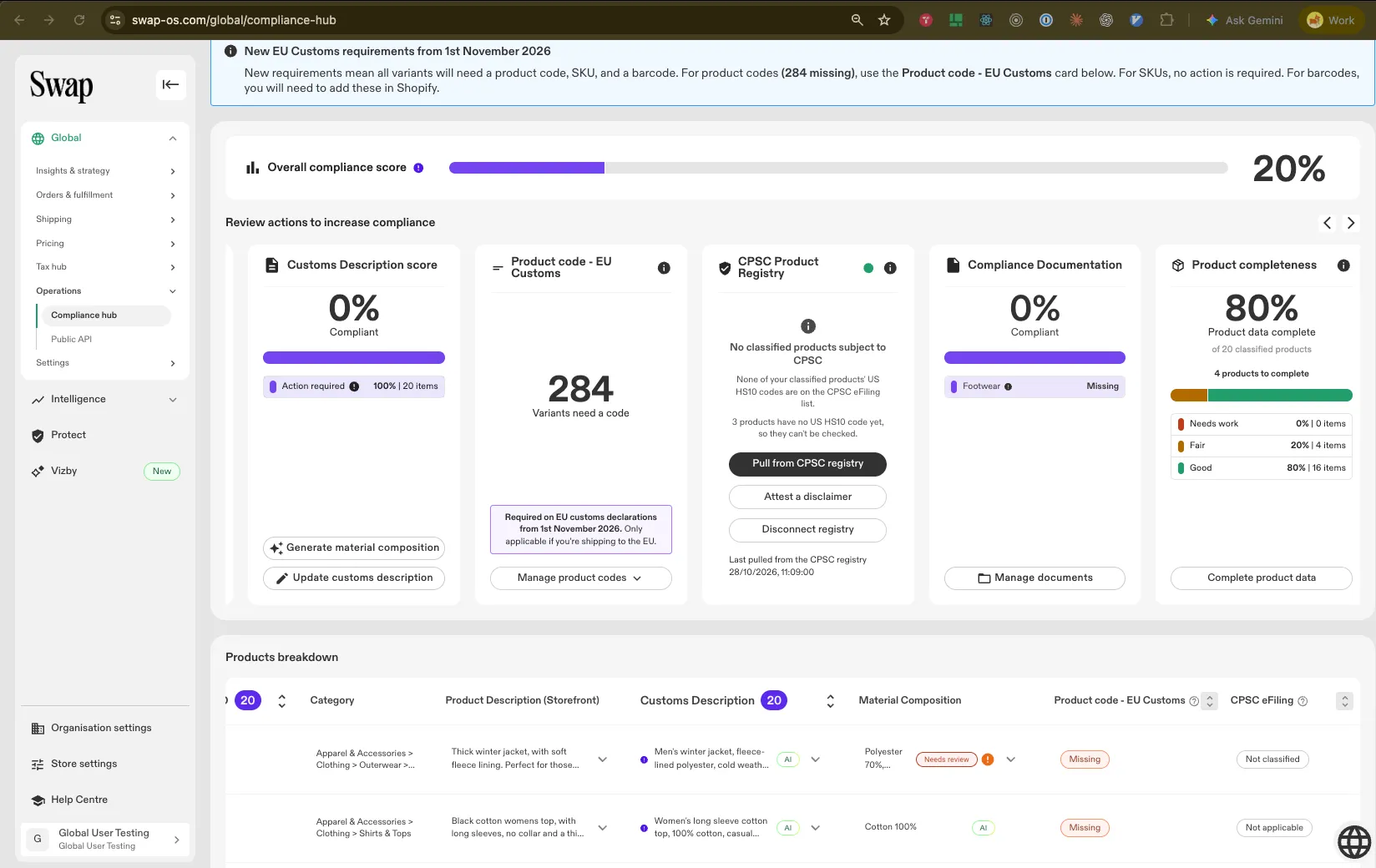
Click Pull from CPSC registry any time you change something in CPSC, so the card stays up to date.
Swap matches each variant on its own: barcode (GTIN, UPC or EAN) first, then the SKU against each certificate's SKU, model number and Alternate ID. If a variant matches more than one certificate, it's left unmatched.
To switch to a different key or CPSC account, click Disconnect registry, then connect again. Data already matched to your products stays.
Renewing your CPSC key
CPSC keys expire after 90 days. The card shows a warning 14 days before yours expires. Swap doesn't send an email reminder, so put the date in your calendar.
To renew, create a new API token and secret in CPSC, then click Update credentials on the card.
What the card tells you
The card says | What it means | What to do |
No products subject to CPSC | None of your products are on CPSC's list | Nothing |
CPSC scope not checked, or N products have no US HS10 code yet | Swap can't check some products | Add 10-digit US codes |
A number with "products subject to CPSC" and Connect registry | Some products are on CPSC's list | Connect your CPSC registry if you have certificates, or Attest a disclaimer |
A number with "products have no certificate in the CPSC registry" | You're connected, but some certificates are missing | Click Go to CPSC, fix it there, then click Pull from CPSC registry |
All in-scope products have registry data | Everything is covered | Nothing |
Expiring soon | Your CPSC key expires within 14 days | Create a new key in CPSC, then click Update credentials |
Your CPSC key no longer works, or has expired | Your key has stopped working | Create a new key in CPSC, then click Update credentials |
Your CPSC key doesn't point to exactly one account with certificates | The key can see several accounts, or an account with no certificates | Click Disconnect registry, then connect a key for the one account that holds your certificates |
Last pull from the CPSC registry failed | The last pull didn't finish | Try again later. Contact support if it keeps happening |
What the badges on the products table mean
Badge | What it means |
Complete | On CPSC's list, and every variant has registry data |
Partial · X of Y | On CPSC's list, and some variants have registry data |
Missing | On CPSC's list, and no variant has registry data or a disclaimer |
Disclaimed | You've confirmed Disclaim A or B |
Not applicable | The product's US code isn't on CPSC's list |
Not classified | No US code yet, so Swap can't check it |
Fixing common errors
Message | What to do |
CPSC rejected this token and secret | The details are wrong, or the key has expired. Create a new key in CPSC and try again. |
Could not connect to CPSC Registry, or Could not pull from the CPSC registry | Try again later. Contact support if it keeps happening. |
Another variant of this product says something different | Give every size and colour of the product the same answer. |
This product already has a CPSC registry reference, so it can't be disclaimed | The product has a certificate, so Swap uses that instead. |
This product changed since you downloaded the file | Download a fresh spreadsheet and fill it in again. |
Your products changed while this was open, or after you reviewed them | Check the file again and run the action again. |
This CPSC key can see more than one account | Connect a key for the one account that holds your certificates. |
Disclaim B is only for products on CPSC's list | You've put B against a product that isn't on CPSC's list. Check with your customs broker which answer fits the product. |
Disclaim B only allows the intendedUseCode 130.006 (or leave it blank) | Another code was used with Disclaim B. Use 130.006 or leave it blank. |
This screen is out of date, so nothing was saved | Refresh the page and try again. |
Frequently asked questions
Does Swap file with CPSC for me?
No. Swap doesn't file customs entries. You confirm the answer for each product, and Swap records it and adds it to your commercial invoices. The determination and the responsibility for its accuracy stay with you as the importer.
Do I need a CPSC account to confirm a disclaimer?
No. You only need a CPSC account if you have products with a CPSC certificate and want to connect your registry.
Who chooses the intended-use code?
You do. Swap never chooses or suggests one, because it's a legal decision about your product. Check CPSC's guidance or ask your customs broker if you're unsure.
Does Swap create or change my CPSC certificates?
No. Swap only reads your certificate details from CPSC.
What happens if a product's HTS code changes?
If a new code moves the product on or off CPSC's list, your old answer may no longer fit. Swap stops sending an answer that no longer matches the product's code, and your shipments carry on. Check the product on the CPSC Product Registry card and confirm a new answer if one is needed.
Do my answers appear on all my invoices?
No. They only appear on invoices for shipments to the US.
This guide is provided for informational purposes. As the importer, you're responsible for the accuracy of your CPSC answers and certificate data. Swap Commerce does not register products or certify compliance on your behalf.